Build a relative strength stock screener in 30 minutes
A step-by-step guide to building a relative strength stock screener in 30 minutes — define your universe and benchmark, pull and normalize OHLCV data, compute RS/composite ranks, and export/schedule a screener table you can iterate with better signal filters.
Build a relative strength stock screener in 30 minutes
A step-by-step guide to building a relative strength stock screener in 30 minutes — define your universe and benchmark, pull and normalize OHLCV data, compute RS/composite ranks, and export/schedule a screener table you can iterate with better signal filters.
If you’ve ever “felt” a stock was strong but couldn’t prove it, you’re not alone—and that’s exactly where most screeners fall short. Without a clear benchmark, timeframe, and ranking method, you end up chasing noise.
In the next 30 minutes, you’ll build a relative strength screener that’s explicit about what it measures and why. You’ll fetch price data, compute RS scores and composite ranks, generate a clean table, export it for review, and then automate runs with caching and alerts so it stays useful week after week.
Table of Contents
- Define the screenerPick a universeSet the benchmarkChoose the timeframeAdd trade filters
- Get the price dataChoose a data sourceInstall dependenciesDownload OHLCVNormalize the data
- Compute relative strengthCalculate returnsDerive RS scoresCreate composite ranksSanity-check results
- Build the screener table
- Export and review
- Run it on scheduleCreate a run scriptAdd cachingSchedule executionAdd alerts
- Improve signal qualityTrend confirmationVolatility controlSector contextOutlier handling
- Ship your first screener—then tighten the signal
- Frequently Asked Questions
- Turn RS Into Watchlists
Define the screener
You’re building a screener you can rerun next week and get comparable results. That requires fixed choices: universe, benchmark, timeframe, and liquidity rules.
Example goal: “Find large-cap stocks beating SPY over 3–12 months, with enough volume to trade.”
Pick a universe
Your universe decides what “good” even means, and it prevents accidental cherry-picking. Pick one source, then write rules you won’t change mid-test.
- Choose a source: S&P 500, Nasdaq-100, sector list, or your watchlist.
- Define inclusion: active tickers, common shares, primary listings only.
- Define exclusions: ADRs, preferreds, warrants, ETFs, recent IPOs.
- Freeze membership: use today’s list, or a point-in-time snapshot.
- Store it: save tickers to a file or table.
If your tickers change silently, your “edge” becomes a moving target.
Set the benchmark
Relative strength is always “versus something,” so pick the yardstick that matches your intent. Use SPY for broad large-cap, QQQ for growth-heavy tech, or a sector ETF for intra-sector strength.
Define the formula in plain terms, then keep it constant:
- Return-based: RS = StockReturn(lookback) − BenchmarkReturn(lookback)
- Ratio-based: RS = (StockPrice / BenchmarkPrice) change over lookback
If you switch benchmarks later, you’re asking a different question.
Choose the timeframe
Timeframes control your signal’s personality. Short windows chase momentum bursts, and long windows reward sustained leaders.
- Use 1M for fast rotation.
- Use 3M for swing trends.
- Use 6M for primary trend.
- Use 12M for durability.
- Combine by rank-averaging, not raw returns.
When in doubt, rank each window, then average ranks for stability.
Add trade filters
Filters stop your screener from recommending stuff you can’t trade or shouldn’t touch. Write them as hard thresholds, like “price > $5” and “$ volume > $20M/day.”
A practical starter set:
- Price floor: avoid penny-stock behavior.
- Dollar volume: exclude thin prints, not just low share volume.
- Volatility cap: remove extreme gap risk (optional).
Your signal isn’t useful if execution breaks it.
Get the price data
Your screener lives or dies on clean adjusted prices. You want one table where each column is a ticker, plus your benchmark, with aligned dates and no surprises. Think: “Adj Close only, one row per trading day.”
Choose a data source
You need adjusted closes, stable symbols, and a sane rate limit. Pick the source you can rerun daily without babysitting.
| Source | Adjusted prices | Reliability | Limits |
|---|---|---|---|
| Stooq | Yes | High | None obvious |
| Yahoo | Yes | Medium | Unofficial, flaky |
| Alpha Vantage | Yes | Medium | Tight free quota |
If you want frictionless reruns, Stooq is the boring choice that keeps working.
Install dependencies
Install the packages once, then prove imports work in your environment. That one-minute test saves an hour later.
- Create and activate a virtualenv (or conda env).
- Install:
pip install pandas numpy pandas-datareader yfinance. - Run Python and execute:
import pandas as pd; import numpy as np. - Verify data libs import:
import pandas_datareader as pdr; import yfinance as yf.
If imports fail now, your screener won’t “magically” work later.
Download OHLCV
Fetch daily adjusted close for every ticker and your benchmark. Keep it in one DataFrame, because relative strength is column math.
- Define
tickers = [...]andbenchmark = 'SPY'(or your market proxy). - Download with one call, then select adjusted close:
yf.download(tickers+[benchmark], auto_adjust=False)['Adj Close']. - Rename columns to clean tickers and sort the index by date.
- Save a raw cache:
adj.to_parquet('adj_close.parquet').
Caching turns “data work” into a two-second reload.
Normalize the data
Markets have holidays, IPOs, and stale series. You need aligned dates and a rule for missing history, or your rankings will lie.
Start by dropping duplicated dates and sorting the index. Then align everything to the benchmark’s trading calendar, because that’s your comparison baseline. Finally, enforce a minimum lookback, like 252 trading days, and drop tickers that don’t meet it.
The first time you see a top-ranked stock with 40 days of data, you’ll be glad you added that filter.
Compute relative strength
Relative strength is just performance in context. You’re comparing each ticker to the same yardstick, then ranking the spread.
Your output should make leaders obvious and laggards undeniable. Think “AAPL +6% vs SPY” instead of “AAPL +6%.”
Calculate returns
Compute returns per lookback so every ticker and your benchmark share identical windows. Do it on adjusted closes, or splits and dividends will lie to you.
- Pick lookbacks, like 21/63/126/252 trading days.
- For each ticker, compute return = (Px / Px_lag) - 1.
- Compute the same returns for the benchmark, like SPY.
- Align on date, then drop rows with missing lags.
- Store one row per ticker per date, wide or long.
If your dates don’t line up, your ranks won’t either.
Derive RS scores
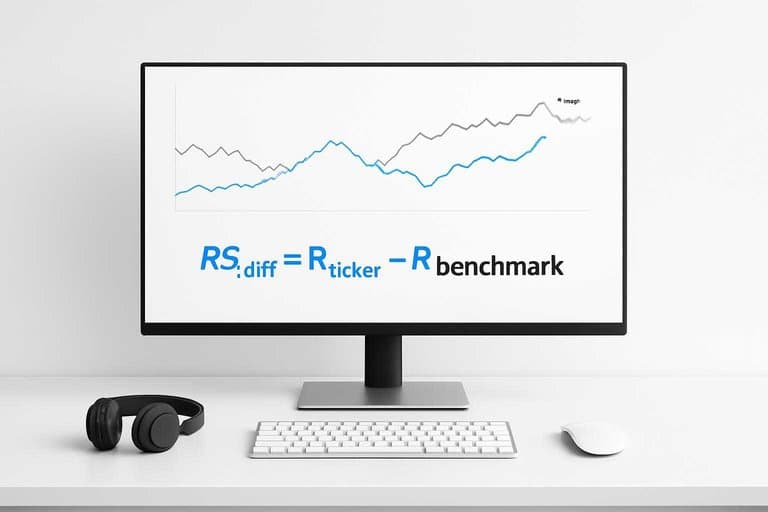
RS is the gap between a ticker’s return and the benchmark’s return. That gap is what you rank, because it shows who is truly leading.
Core formula:
- RS_diff = R_ticker - R_benchmark
Optional ratio version:
- RS_ratio = (1 + R_ticker) / (1 + R_benchmark) - 1
Use diff when you want “percentage points of outperformance.” Use ratio when you care about compounding symmetry.
Pick one and stick with it, or you’ll compare apples to math tricks.
Create composite ranks
Single-window RS is noisy, so you blend timeframes into one score. Weights force your screener to match your holding period.
- For each window, rank tickers by RS (higher is better).
- Convert ranks to a consistent scale, like 0–100.
- Apply weights, like 40/30/20/10 from shortest to longest.
- Sum weighted scores into one composite per ticker.
- Sort descending and output top/bottom lists.
Your weights are your strategy in disguise.
Sanity-check results
You’re hunting for “obviously wrong,” not statistical perfection. A quick check beats a week of debugging blind.
Spot-check a few names:
- A steady leader should sit near the top.
- A recent crash should sink across short windows.
- A flat stock shouldn’t outrank a ripping sector.
Then scan for data issues:
- Missing prices creating extreme returns.
- Corporate actions not adjusted.
- Thinly traded tickers with stale closes.
If the extremes don’t make intuitive sense, trust the bug, not the rank.
Build the screener table
You need one table that answers, “What do I buy, and why this ticker?” Make it sortable, filterable, and boringly consistent across every row.
Use this structure for your final screener output.
| Column | Type | Example | Sort/Filter |
|---|---|---|---|
| Ticker | Text | NVDA | Filter |
| RS Score (0–100) | Number | 87.4 | Sort desc |
| RS Rank | Integer | 12 | Sort asc |
| Trend Filter | Pass/Fail | Pass | Filter |
| Liquidity ($ vol) | Number | 45M | Filter min |
If you can’t sort by RS and instantly drop illiquid names, you built a spreadsheet, not a screener.
Export and review
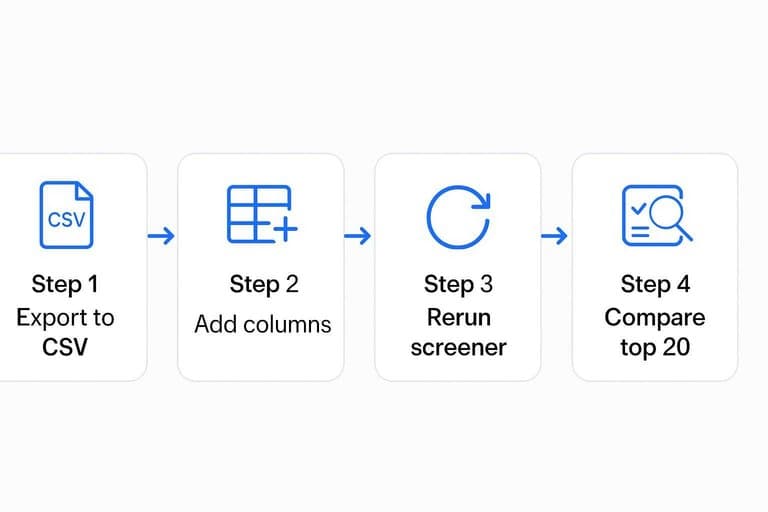
Save your picks somewhere you can sort, filter, and sanity-check. Then rerun the screener to verify it keeps surfacing the same leaders.
- Export your output to CSV with the core fields: ticker, RS score, period, date.
- Paste the CSV into Google Sheets and freeze the header row.
- Add two columns: “Run date” and “Notes” for quick annotations.
- Rerun the screener with the same settings and export again.
- Compare the top 20 tickers across runs using a simple MATCH or VLOOKUP.
If your top names churn on identical settings, your data or calculations are drifting.
Run it on schedule
A screener only helps if it stays fresh. You want one weekly job that pulls new prices, recalculates ranks, and drops a file you can open fast.
Pick a consistent output path like ./out/rs_screener_latest.csv. Your future self will thank you.
Create a run script
One command should run the whole pipeline. Parameters keep you from editing code every week.
- Create
run_screener.pythat calls: download → cache → rank → export. - Add CLI args:
--universe,--benchmark,--start,--end,--out. - Default
--endto today, and--starttoend - 400d. - Write outputs to both dated and latest files.
- Exit non‑zero on failures, and log the exception.
Once it’s one command, scheduling becomes boring. Boring ships.
For concrete examples of weekly timing, see these weekly cron expressions.
Add caching
Repeated downloads waste time and invite rate limits. Cache locally, then only fetch what’s missing.
Use a simple layout like:
./data/raw/{symbol}.parquet./data/meta/last_updated.json
On each run:
- Load cached prices for each symbol.
- Detect missing dates between the last bar and
--end. - Request only the missing range, then append and dedupe.
- Fail fast if data is stale past your tolerance.
Speed changes your habits. Fast reruns make you test more ideas.
Schedule execution
Weekly automation removes “I forgot to run it” risk. Use the scheduler your machine already trusts.
- Pick a run time after market close, like Saturday 08:00.
- Cron (macOS/Linux):
0 8 * * 6 /usr/bin/python3 /path/run_screener.py .... - Task Scheduler (Windows): create a weekly trigger and call
python.exewith args. - Write outputs to a fixed folder like
/reports/rs/. - Log to
/reports/rs/logs/run_YYYYMMDD.txtfor debugging.
Consistency beats cleverness here. One folder, one schedule, no surprises.
Add alerts
A file is passive. Alerts tell you when leadership shifts, which is the point of relative strength.
- Email top-10 entrants since last week
- Slack the tickers that dropped out
- Include rank, RS score, and change
- Attach the latest CSV link
- Alert only on meaningful moves
If you aren’t notified on change, you’re just warehousing data.
Improve signal quality
Relative strength finds what’s winning, even when it’s a one-week fluke. Add trend checks and simple risk gates, so your “leaders” behave like leaders.
Trend confirmation
Use trend confirmation to stop buying “strong” charts in downtrends. You’re filtering for names with both long-term support and fresh momentum.
- Compute the 200-day simple moving average (SMA200) on daily closes.
- Keep tickers where Close > SMA200 on the latest day.
- Compute the 50-day simple moving average (SMA50).
- Require SMA50 today > SMA50 20 trading days ago.
- Re-rank relative strength only on survivors.
When RS and trend agree, you’re trading tailwinds, not rebounds.
Volatility control
Volatility filters keep “lottery tickets” from topping your list. Pick one metric, then cap it.
- Filter by ATR% below a max threshold
- Filter by 20-day stdev below a max
- Exclude gap-prone microcaps by price floor
- Exclude names with oversized daily ranges
You want smooth strength, because smooth strength is tradable.
Sector context
Relative strength is often a sector story in disguise. Add sector labels and a sector-RS column, so you see when a stock is surfing a group wave.
Example: If a stock ranks top-10, but its sector ranks bottom-quartile, treat it as suspect. The opposite is better: “top stock in a top sector.”
Sector context turns your screener into a map, not a list.
Outlier handling
Outliers can hijack rankings after a single spike or crash. Clip extremes and enforce enough history, so your RS score reflects a real window.
- For each lookback return series, winsorize at the 1st and 99th percentiles.
- Compute returns on the winsorized series, not raw.
- Set minimum history per window (e.g., 252d window needs 252 bars).
- Drop tickers failing any history requirement.
- Recompute RS ranks with the cleaned dataset.
If one day can change the leaderboard, your screener is measuring noise.
Ship your first screener—then tighten the signal
- Run the screener on your chosen universe and benchmark, then quickly sanity-check the top and bottom names against their charts.
- Export the table (CSV/Sheets), review the leaders, and add simple trade filters (liquidity, price, volatility) to remove untradeable outliers.
- Put it on schedule with caching and an alert for “new entrants” into the top ranks so you only review meaningful changes.
- Improve signal quality iteratively: confirm trend, control volatility, add sector context, and handle extreme outliers—then lock the settings that match your holding period.
Frequently Asked Questions
Turn RS Into Watchlists
Building a relative strength stock screener is the easy part; keeping data fresh, improving signal quality, and reviewing leaders fast is where most workflows break.
Open Swing Trading delivers daily RS rankings, breadth, and sector/theme rotation context across ~5,000 stocks so you can shortlist breakout leaders in minutes—get 7-day free access with no credit card.