
Build sector theme strength ranks in 15 minutes
A fast, repeatable guide to building sector theme strength ranks in 15 minutes—define a universe and strength lens, pull and validate price data, compute normalized relative returns, apply a trend filter, and combine windows into a composite score you can rank.
Build sector theme strength ranks in 15 minutes
A fast, repeatable guide to building sector theme strength ranks in 15 minutes—define a universe and strength lens, pull and validate price data, compute normalized relative returns, apply a trend filter, and combine windows into a composite score you can rank.
If your sector “leaders” change every time you change the lookback window, you don’t have a ranking problem—you have a workflow problem. Without consistent inputs and filters, relative strength lists turn into noise.
This guide gives you a 15‑minute, end-to-end process to rank sector themes the same way every time: pick a clear universe, align clean price data, compute normalized relative strength across time windows, apply a simple trend gate, and roll it all into one composite score you can trust.
Define the workflow
You’re building a fast, repeatable sector strength rank. The goal is a ranked sector list with strength scores and one sanity-check chart you trust.
Pick sector universe
Pick one sector set and one benchmark, so every score has a clean reference point.
- Use GICS 11, or sector ETFs like XLK/XLF/XLE
- Choose one benchmark, usually SPY
- Record tickers in one plain list
- Note data source, like “Yahoo” or “Polygon”
- Lock symbol formatting, like “XLK” not “XLK.US”
If your universe shifts midstream, your “rankings” become a new dataset, not a new insight.
Choose strength lens
Pick a single definition of “strong,” then write it down like a recipe you can rerun next week.
Example: “Relative return vs SPY, only if above 200D SMA, using 63-day momentum.”
If you can’t state the lens in one sentence, you’re about to optimize noise.
Set time windows
Define your lookbacks and weights once, so your ranks don’t drift with your mood.
- Choose lookbacks like 21/63/126 trading days.
- Pick weights, like 50%/30%/20% for 1M/3M/6M.
- Confirm day-count convention, like “252 trading days per year.”
- Set rebalance cadence, like weekly close or month-end.
- Write one rule for missing data, like “drop the sector.”
Your rebalance schedule is the hidden engine of the whole system.
Gather price data
You need clean, comparable price series before you can rank sector strength. One bad timestamp or unadjusted series can flip a “leader” into a laggard overnight.
Select data source
Pick one source you trust, and keep it consistent across sectors and your benchmark. “Adjusted close” is the field that survives splits and dividends without surprises.
Google Sheets works for quick ETFs with GOOGLEFINANCE, Excel works if your data vendor plugs in cleanly, Python works if you want repeatable pulls, and platform exports work if you already have permissions.
Whatever you choose, require three columns every time: date, adjusted close, symbol.
The real decision is repeatability, not convenience.
Import and align
Load every series into one calendar so returns compare like-for-like.
- Import sector prices and benchmark prices into one workspace.
- Sort each series by date ascending, and remove header junk.
- Forward-fill only tiny gaps, like one missing trading day.
- Trim to the common date range across all symbols.
- Output one table: Date + one Adj Close column per symbol.
If you don’t share dates, you’re ranking data errors.
Quality checks
Run fast checks before you touch returns. You’re looking for silent failures, like duplicated rows or a missing benchmark.
- Check for duplicate dates per symbol
- Scan for one-day 30% spikes
- Confirm benchmark has zero missing dates
- Validate row count matches date range
- Spot-check last close vs chart
Five minutes here saves an hour of debugging later.
Compute relative returns
You need clean, comparable returns before any “strength” score means anything. The goal is simple: same windows, same math, every sector against one benchmark.
Calculate percent returns
Use total return over each lookback window so every sector shares the same ruler.
- Choose windows (e.g., 20, 60, 120 trading days).
- For each sector and the benchmark, pull start and end adjusted close.
- Compute return: (End / Start) - 1.
- Store results as a table: rows = sectors, columns = windows.
- Keep the benchmark as its own row for later subtraction.
If your start and end prices aren’t aligned, your “signal” is just timestamp noise.
Create relative strength
Relative strength is just excess return versus your benchmark, per window.
- Take the returns table for a single window.
- For each sector, subtract the benchmark return.
- Repeat for every window.
- Stack outputs into a matrix: rows = sectors, columns = windows.
The moment you subtract the benchmark, you stop confusing bull markets with skill.
Normalize for ranking
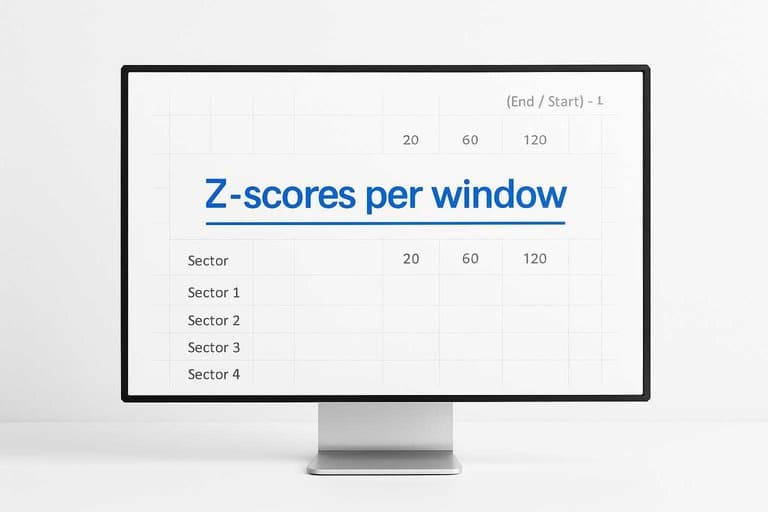
Raw relative returns aren’t comparable across windows because volatility changes with horizon. Normalize within each window so ranks are stable and interpretable.
Use either:
- Z-scores per window: score = (x - mean) / stdev
- Percentiles per window: score = rank(x) scaled to 0–100
Output a normalized score table with the same shape as your relative-returns matrix.
Pick percentiles if you want “0–100” clarity; pick z-scores if you want distance, not just order.
Apply trend filter
You want ranks that reward leadership, not falling knives. A simple trend filter keeps your “strong” sectors above supportive structure, like the 200-day SMA.
Choose trend rule
Pick one rule and never negotiate with it mid-run. Use price above the 200-day simple moving average (SMA200), measured on the sector’s closing price.
Example: “XLK closes above SMA200 = pass; below = fail.”
Consistency beats cleverness, because your ranks must be comparable week to week.
Compute trend flags
Turn the rule into a binary column your ranking code can read.
- For each sector, compute SMA200 from daily closes.
- Get the latest close for the same date.
- Set
trend_pass = 1ifclose > SMA200, else0. - Store
trend_passalongside your strength score inputs.
If the flag isn’t in the dataset, the filter isn’t real.
Handle failures
Decide how you treat downtrends before you look at results. Write the rule in your notes, like a trading plan.
- Exclude failed sectors from the ranking universe.
- Zero out the final score when
trend_pass = 0. - Subtract a fixed penalty, like
-20 points. - Downweight the score, like
score * 0.25.
Pick the harshness that matches your mandate, then lock it in.
Build composite score
You already have window scores and a trend flag. Now you need one number per sector you can sort without debates.
Think of it as your “StrengthScore,” like a credit score. One column. One ranking table.
Weight the windows
Different windows deserve different respect. Short-term moves lie more often, so you weight them less.
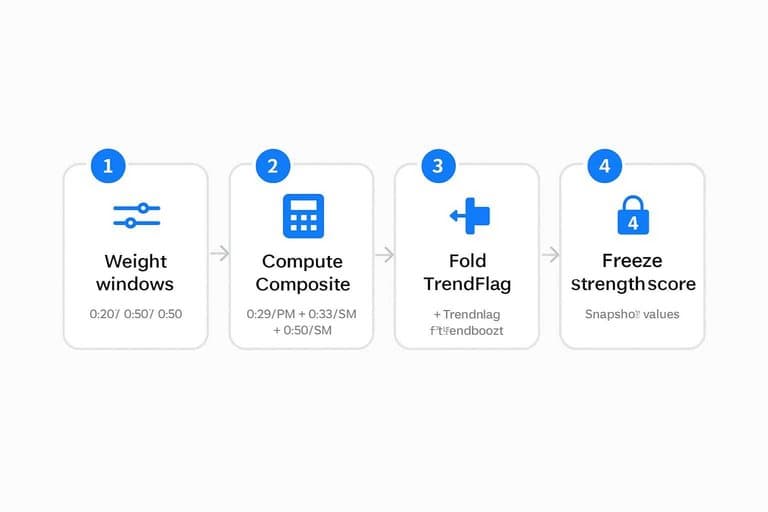
- Pick weights for 1M/3M/6M, like 0.20 / 0.30 / 0.50.
- For each sector, compute: Composite = 0.20Score_1M + 0.30Score_3M + 0.50*Score_6M.
- If you have TrendFlag, fold it in: Composite = Composite + (TrendFlag * TrendBoost).
- Sanity-check with one example sector and confirm the math matches expectation.
Choose weights once, then stop touching them every time the market gets weird.
Add stability tweak
Raw composites can whip around because one bad day distorts ranks. Add one small adjustment that punishes noise, not performance.
Use a rank-average smoothing: StrengthScoreRaw = Composite, then StrengthScore = (Rank_1M + Rank_3M + Rank_6M)/3 * -1.
Pick either weighted scores or smoothed ranks, not both. Consistency beats cleverness.
Freeze final column
Your table should produce the same answer tomorrow if the inputs did not change. That requires one official column for sorting, and it must be reproducible.
- Create a final column named “StrengthScore” that points to your chosen formula.
- Sort sectors by StrengthScore descending and confirm ties behave predictably.
- Copy the StrengthScore column and paste as values into a “Snapshot” tab.
- Protect the Snapshot range or lock the StrengthScore formula cells.
If you can’t freeze it, you can’t compare runs. Rankings become vibes.
For a standardized sector universe and tickers, reference the 11 S&P 500 sectors.
Generate the ranks
Sort your sectors by StrengthScore so you can pick winners fast and explain the call. Then assign ranks and buckets so your decisions stay consistent week to week.
- Sort the sector list by StrengthScore, highest to lowest.
- Add a Rank column, starting at 1 for the top sector.
- Break ties with your secondary metric, like 4-week momentum.
- Assign buckets, like Top 3, Middle, and Bottom 3.
- Freeze the logic in a note, like “bucket by rank only.”
Buckets turn raw scores into decisions your future self won’t argue with.
Turn the spreadsheet into a repeatable ranking ritual
- Freeze inputs: lock your sector universe, time windows, and the final composite-score column (values-only).
- Rank: sort by composite score descending and assign ranks (break ties with your stability metric or the longest window).
- Sanity-check: confirm top/bottom names match the relative-strength series and that trend-failed themes are clearly flagged or excluded.
- Publish: save a dated snapshot and a clean “current ranks” view so you can compare week-over-week without recalculating history.
- Use it: map ranks to actions (overweight/hold/avoid) and set a fixed refresh cadence (weekly or monthly) to keep decisions consistent.
Frequently Asked Questions
Is sector theme strength the same as sector relative strength?
Not exactly. Sector theme strength usually blends relative performance with a “theme” grouping (industry narrative or factor exposure) and often adds filters like trend or risk controls, while pure relative strength is typically just performance vs a benchmark.
What lookback windows work best for sector theme strength rankings?
Most traders use a mix of short and medium windows like 1, 3, and 6 months (or 20/60/120 trading days) to capture both recent momentum and durability. Using multiple windows reduces the chance one unusual month dominates the rankings.
How often should I update sector theme strength ranks?
Weekly is the most common cadence for swing and position strategies, while daily updates are useful if you trade tactically around rotations. Monthly updates often react too slowly to regime shifts in leadership.
How do I validate that a sector theme strength model actually works?
Backtest a simple rule like “hold the top 3 sectors, rebalance weekly or monthly” and compare to a benchmark using CAGR, max drawdown, and Sharpe. Also run a walk-forward test (e.g., train on 3–5 years, evaluate on the next 1 year) to check stability.
What can I use if I don’t have sector ETFs or clean sector price data?
Use sector indexes (S&P Dow Jones, MSCI) or build proxies from liquid large-cap constituents and equal-weight them. As a fallback, pull total return series from platforms like TradingView, Koyfin, or Bloomberg and keep the benchmark consistent across sectors.
Turn Ranks Into Watchlists
Building sector theme strength ranks is fast on paper, but keeping the data clean and updating scores daily is where most workflows break down.
Open Swing Trading refreshes relative strength, breadth, and sector/theme rotation context after each close so you can spot emerging leaders and build a focused watchlist in minutes.
Sources
- Yahoo Help — What is the adjusted close? — referenced in Select data source
- SectorSPDRs.com — “The 11 Sectors of the S&P 500” (Sector SPDR document) — referenced in Freeze final column