How a Swing Trading Scanner Works After the Close
An explainer of what happens inside a swing trading scanner after the bell—how post-close bars are built, data is ingested and normalized, indicators are computed without lookahead, and rules/alerts are evaluated despite after-hours and restatement quirks.
How a Swing Trading Scanner Works After the Close
An explainer of what happens inside a swing trading scanner after the bell—how post-close bars are built, data is ingested and normalized, indicators are computed without lookahead, and rules/alerts are evaluated despite after-hours and restatement quirks.
Your scanner says a stock “broke out” after the close—then the signal disappears the next morning. Did the market change, or did your data pipeline?
This explainer walks you through what a swing trading scanner actually does once the closing bell hits: how it forms the official daily bar, cleans and adjusts data, computes indicators safely, and applies your rules and rankings. You’ll also see why after-hours prints and vendor restatements can legitimately rewrite yesterday’s results.
Post-Close Snapshot
After the bell, your scanner consumes a frozen end-of-day snapshot, not a live market. That snapshot includes final prints, completed bars, and any corporate-action flags that change how history is interpreted. “After the close” often really means “after all late reports and feeds agree,” not 4:00:00 p.m. sharp.
Official close vs prints
The close can mean the closing auction price, the last reported trade, or a consolidated vendor close. You’ll see differences when one feed prefers auction results, while another uses the last eligible print. Example: a 4:00:00 auction at $50.00, followed by a late-reported $50.12 print, can split your backtest in half.
That’s the line that gets crossed when you mix feeds without normalization.
Bar building pipeline
EOD bars look simple, but every vendor makes choices that change signals.
- Filter session hours and exclude out-of-session prints
- Include or exclude odd-lots and auction prints
- Attribute volume by trade conditions and corrections
- Resolve timestamps to exchange or SIP time
- Apply rounding and price-validity rules
If your scanner triggers on the “close,” these rules decide what you actually traded.
Adjustments and calendars
Your EOD dataset is shaped by adjustments and the calendar as much as by price. Splits and cash dividends can rewrite history through adjusted close, adjusted volume, or both. Halts, early closes, and timezones decide which prints belong to “today,” especially around holidays or half-days.
Get the calendar wrong and your scanner starts predicting yesterday’s market.
Data Ingestion Flow
Your scanner is only as good as last night’s ingest. Miss one split file or mis-time one close, and “new highs” turn into fiction.
- Pull vendor EOD bars, corp actions, and symbol masters after the official close.
- Land raw files in immutable storage with run IDs, checksums, and timestamps.
- Validate coverage and schema, then quarantine bad symbols and late files.
- Apply splits, dividends, and mappings, then normalize into canonical OHLCV.
- Upsert partitioned EOD tables and build indexes for fast scanner queries.
If your ingest is reproducible and auditable, every scan result becomes defensible.
Normalization and Cleaning
Your scanner only works if every price series is comparable across symbols and time. If you mix identities or inconsistent price scales, you’ll trigger fake breakouts and miss real ones.
Symbol identity mapping
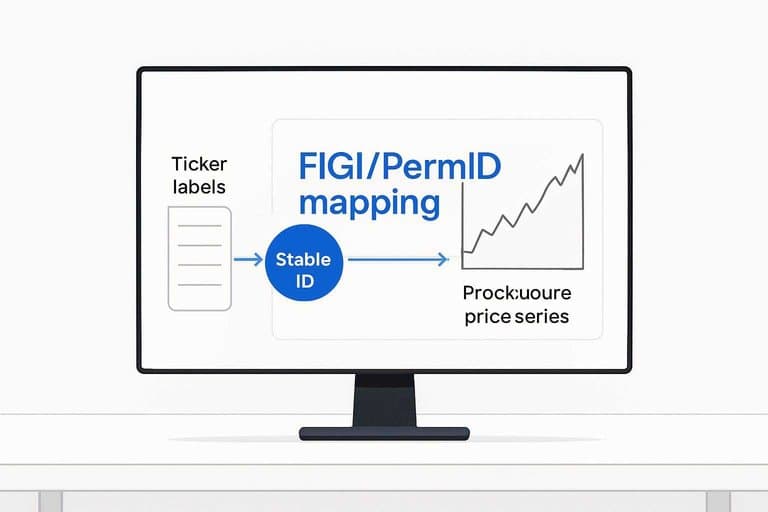
Tickers are labels, not identities, so your scanner must follow the company when the label changes. Without mapping, a “new” ticker looks like an IPO and your indicators reset mid-history.
A solid pipeline maps each bar to a stable identifier, then stitches history across events:
- Ticker changes and mergers (e.g., “FB” → “META”)
- Share classes with different liquidity (BRK.A vs BRK.B)
- Delistings and relistings that reuse old tickers
- Corporate entity changes that keep economics but change symbol
- FIGI/PermID mapping to preserve continuity
If the identity breaks, your backtests lie first, then your alerts follow.
Quality checks
Bad data creates good-looking signals, so you validate bars before you compute indicators. You want errors to fail loudly, not blend into your ranks.
- Flag missing daily bars
- Detect outlier price spikes
- Catch stale or zero volume
- Verify corporate action adjustments
- Remove duplicated trades
A single bad print can manufacture a “breakout” your order can never fill.
Adjusted vs unadjusted
Adjusted data keeps indicators consistent through splits and dividends, so scanners often compute signals on adjusted bars. Otherwise, a 2-for-1 split can look like a 50% crash and wreck your moving averages.
Unadjusted prices still matter when you plan orders and manage risk, because execution happens in today’s raw quotes. Your scanner might flag a breakout on adjusted levels, then you place entries, stops, and position sizes on unadjusted levels.
Compute signals on adjusted data, but trade on unadjusted reality.
Indicator Computation Engine
Your scanner’s compute engine turns end-of-day (EOD) bars into indicators the same way, every run. It does it fast by reusing prior work and strict about time by never “peeking” past the close.
Rolling window mechanics
Rolling indicators use a fixed-length window over your EOD series, like the last 20 closes. You need a warm-up period because the first N-1 bars cannot fill the full window.
A typical engine keeps an index-aligned series and marks early values as undefined until enough bars exist. Examples:
- MA(20): first valid value appears on day 20, not day 1.
- ATR(14): needs 14 true ranges; early ATR often uses a seeded average.
- RSI(14): needs average gain and loss; initial seed changes early readings.
Those “weird” first values are normal, so treat them as warm-up, not signals.
Incremental updates
You want indicator computation to be O(1) per symbol per day, not O(N). You get there by updating state instead of re-scanning history.
- Cache prior rolling sums, averages, and last EMA value
- Update only the newest bar, not the whole window
- Vectorize across symbols when data is aligned
- Precompute shared transforms like returns and true range
- Persist computed columns to avoid recomputing on reruns
If daily runs still feel slow, your bottleneck is usually I/O, not math.
Lookahead avoidance
Indicators must use only completed bars, or your backtest becomes fiction. The rule is simple: if you trade “tomorrow,” you can only compute using data through “today’s close.”
Common off-by-one mistakes:
- Computing signals with today’s close, then “entering” at today’s close.
- Using a rolling window that accidentally includes the current forming bar.
- Shifting the indicator the wrong way, so tomorrow’s value leaks into today.
If your equity curve jumps when you fix one shift, you found your lookahead bug.
Rule Evaluation Layer
Your scanner’s “rules” are just executable logic after the close. They become boolean filters, numeric scores, and alert triggers, and the order you run them changes both speed and results.
From query to filter
You start with human rules like “20-day high on above-average volume,” because you need repeatable selection. The scanner compiles those rules into SQL, vectorized expressions, or a feature graph, then runs them across your universe in a fixed sequence.
Most scanners chain predicates like price > 5 AND adv20 > 2M AND rvol > 1.5 AND close >= hh20. Each predicate is a boolean mask, and the masks get intersected until only candidates remain. NaNs and short history need explicit policy: treat as false, backfill, or route to “insufficient data,” because rsi14 on 9 bars is not a signal.
Get the missing-data rules wrong and you’ll “discover” breakouts that never existed.
Ranking and scoring
Filtering answers “is it eligible,” but ranking answers “what do I look at first.” Your scoring layer turns features into sortable numbers, then combines them into a final rank.
- Enforce liquidity minimums by average dollar volume
- Prefer controlled volatility via ATR% bands
- Score trend strength with moving-average slope
- Measure breakout proximity to key levels
- Boost relative volume versus a baseline
If everything ranks well, your scoring is too forgiving.
Universe constraints
Universe rules exist because scan math is cheap, but bad symbols are expensive. You restrict symbols up front so the rest of the pipeline spends time only where execution is plausible.
Common constraints include exchange lists (NYSE/Nasdaq only), market-cap bands, price floors to avoid junk spreads, and minimum average dollar volume for fillability. Some scanners also gate on borrowability or “easy-to-borrow” status, because a perfect short setup that can’t be borrowed is just a screenshot.
Tight universe constraints are a trading edge disguised as housekeeping.
After-Hours Complications
After-hours prints look like “real” trades, but they behave differently than the close. Your scanner has to decide whether those prints count for today’s OHLC and signals.
Extended-hours data is noisy and thin, so many end-of-day scanners ignore it by default. That choice avoids false breakouts triggered by one odd-lot print.
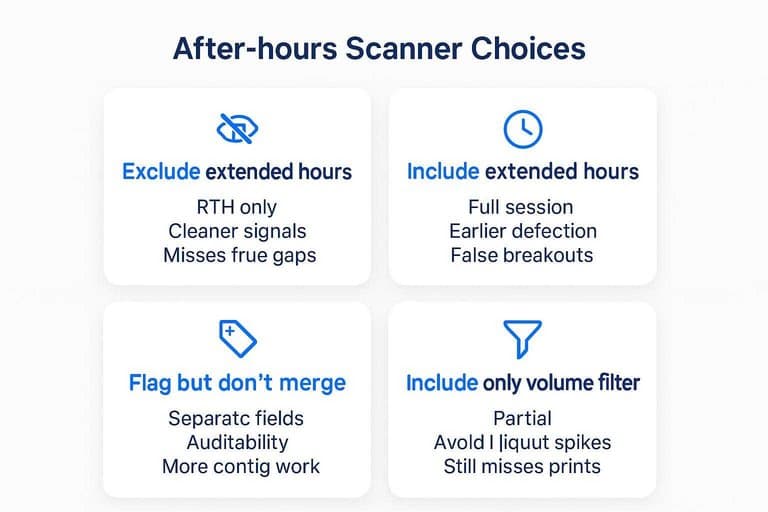
After-hours prints hit different rules than regular-session trades. Compare how scanners typically treat them.
| Scanner choice | Uses for OHLC | Common reason | Typical failure mode |
|---|---|---|---|
| Exclude extended hours | RTH only | Cleaner signals | Misses true gaps |
| Include extended hours | Full session | Earlier detection | False breakouts |
| Flag but don’t merge | Separate fields | Auditability | More config work |
| Include only volume filter | Partial | Avoid illiquid spikes | Still misses prints |
If your backtest and live feed treat after-hours differently, your “edge” is just a data mismatch.
Earnings, news, and gap risk
A swing trading scanner runs “after the close,” but the biggest market-moving inputs often land in the gap between sessions: earnings releases, guidance updates, regulatory headlines, analyst notes, and scheduled economic events. The tricky part is that these catalysts can change tomorrow’s opening price without changing today’s official close.
Your scanner should treat this as a separate layer from OHLC, not something to quietly blend into the close.
Practical policies that keep scans honest:
- Keep EOD signals EOD. If your rule is based on today’s close (breakout, MA cross, relative volume), compute it on regular-session bars and freeze it. Don’t “fix” the setup because an after-hours print moved.
- Add catalyst-aware flags, not replacement prices. If you ingest news/earnings calendars, attach fields like
earnings_after_close,earnings_before_open, orevent_risk_next_session, then let users filter or down-rank those names. - Separate the question “is it a setup?” from “is it tradable tomorrow?” A clean end-of-day breakout can be a terrible next-day entry if the stock is likely to gap through your trigger, stop, or size assumptions.
- Model next-day execution realistically. If your workflow is “scan after close, trade next open,” your backtest should enter at the next session’s open (or next day’s limit logic), not at today’s close. Otherwise, catalysts look like skill.
If you want after-close scans to stay stable while still being actionable, keep the close-based signal immutable and add a parallel “overnight risk” annotation for what can happen before the open.
Outputs and Alerts
Your scanner finishes the heavy math after the close, then turns signals into artifacts you can act on tomorrow. The goal is simple: make results visible, portable, and hard to miss without spamming you.
- Build watchlists by setup type and liquidity tier
- Update dashboards with rank, score, and trigger reason
- Export CSVs for journaling and backtests
- Send alerts with dedupe and cooldown windows
- Log every alert with timestamp and snapshot
Throttling is the difference between “actionable” and “ignored,” so treat alerts like a budget.
Why Results Change
Your after-close scanner feels deterministic, until yesterday’s winners disappear today. Rescans hit revised bars, corrected volumes, and different cached inputs, so the same rules produce new matches. The giveaway is when you rerun a scan and think, “I swear that wasn’t there.”
Vendor restatements
Market data is not final at 4:00 p.m., even if your chart looks settled. Vendors publish late trade corrections, corporate-action fixes, and backfilled prints, then your scanner recomputes indicators on the updated OHLCV.
A few common triggers:
- Late trade busts that change the close
- Split adjustments applied after initial publish
- Backfilled volume from delayed venues
If your inputs move, your “signal” moves with them.
Recompute strategies
You need a policy for what gets recalculated when data shifts. Different strategies trade accuracy for stability.
- Full rebuild of all history
- Rolling backfill of last N days
- Versioned datasets per vendor release
- Immutable daily snapshots for scans
Pick one, then document it, because your users will ask why the list changed.
Caching pitfalls
Even with perfect data, caching can make outputs wobble between runs. Stale caches, partial job failures, or a race between ingestion and scanning can mix “new close” with “old volume” and quietly change ranks.
You’ll see it when two scans minutes apart disagree, or when only some symbols update. Fix the pipeline ordering, or your scanner becomes a timing lottery.
Make Your After-Close Scans Reproducible
- Lock the “as-of” timestamp for each run (official close time, exchange calendar, and vendor cut-off) and store the exact bar/adjustment version used.
- Compute indicators with strict lookback windows and incremental updates, and log inputs so you can replay the same calculation later.
- Separate regular-hours bars from after-hours activity in both rules and UI, and be explicit about adjusted vs unadjusted prices.
- Expect restatements: design for recomputes and cache invalidation so yesterday’s scan can be rederived—not guessed.
Frequently Asked Questions
Do I need real-time data for a swing trading scanner that runs after the close?
Usually not—end-of-day (EOD) scanners only need official daily OHLCV data. Real-time or after-hours feeds matter mainly if you want intraday alerts or to validate liquidity/spreads before placing next-day orders.
How accurate are swing trading scanner results if my broker’s closing price differs from the scanner’s close?
Small close-price differences (often a few cents) can flip signals near thresholds, especially for tight breakouts or indicator crossovers. Use the scanner’s data source consistently for backtesting and set buffers (e.g., 0.2%–0.5%) to reduce “edge-case” flips.
How can I measure whether a swing trading scanner is actually improving my performance?
Track forward performance with a simple log: signal date, entry method, max drawdown, exit rule, and R-multiple, then compare to a baseline (no-scan or manual picks) over at least 50–100 trades. Expect the scanner to improve consistency (hit rate, drawdown, time in trade) more than it guarantees higher win percentage.
Can I use a swing trading scanner for crypto or forex, or is it only for stocks?
You can use the same scanning logic if you have clean daily bars, but market structure differences matter: crypto trades 24/7 and forex sessions vary, so “daily close” must be defined (e.g., UTC 00:00) to keep indicators stable. Liquidity and slippage filters also need different thresholds than equities.
How often should I change my swing trading scanner rules, and how long should I run a setup before judging it?
Avoid frequent rule changes—run a rule set for at least 8–12 weeks or 30–50 signals to get a meaningful sample. Review monthly or quarterly, and only adjust one variable at a time so you can attribute any performance change.
Turn Post-Close Data Into Watchlists
Understanding each after-close step is useful, but turning shifting scanner outputs into consistent, actionable candidates takes a repeatable workflow and context.
Open Swing Trading updates daily after the close with RS rankings, breadth, and sector/theme rotation so you can build focused breakout watchlists in 5–15 minutes—get 7-day free access with no credit card.