Seeing Too Many Stocks? 7 Filters to Fix
A practical checklist to cut a chaotic watchlist down to a tradable set—triage your overload, lock your universe, gate liquidity, set a price band, clamp volatility with ATR%, and align every candidate to your trend rules.
Seeing Too Many Stocks? 7 Filters to Fix
A practical checklist to cut a chaotic watchlist down to a tradable set—triage your overload, lock your universe, gate liquidity, set a price band, clamp volatility with ATR%, and align every candidate to your trend rules.
If your watchlist keeps growing, your decisions get worse—not because you lack ideas, but because everything starts to look “good enough.” You miss entries, chase noise, and spend more time scanning than trading.
This checklist gives you a fast triage map and six hard filters you can apply in minutes: define your universe, eliminate illiquid names, constrain price, control volatility, and enforce trend alignment. You’ll end up with fewer charts, cleaner signals, and rules you can repeat weekly.
Quick Triage Map
You’re not “bad at stock picking.” You’re overloaded. This map helps you name the overload type fast, then apply one filter first.
Overload symptoms
Overload shows up as process bugs, not a lack of willpower. Check which signs describe your last two weeks.
- Your watchlist keeps growing weekly
- You see opposite signals daily
- You miss entries you planned
- You buy “just in case”
- You hop timeframes mid-trade
- You chase spikes after alerts
- You can’t explain your setups
- You feel behind every session
If you check three or more, your problem is scope, not skill.
Root-cause diagnosis
Most overload comes from three missing rules you can write in one sitting. Find your row, then apply the matching fix.
| Root cause | What you do | What breaks | First fix |
|---|---|---|---|
| No universe | Scan everything | Endless candidates | Define 50–200 names |
| No liquidity rules | Include thin names | Slippage, bad fills | Set volume threshold |
| No time horizon alignment | Mix day and swing | Conflicting signals | Pick one timeframe |
Your chart isn’t confusing; your inputs are.
One filter first
Pick one variable to lock based on your constraint: time, money, or edge. Day trading needs a tight universe and strict liquidity; small accounts need liquid names; longer holds need timeframe alignment. Change one filter, run it for 20 trades, then adjust.
Filter 1: Universe Lock
You’re seeing too many tickers because your scan is crawling every market, every venue, and every style. Lock the universe first so every other rule actually matters.
- Pick one market you can explain in one sentence, like “US equities only.”
- Choose one exchange set, like “NYSE + Nasdaq,” and exclude OTC and foreign ADRs.
- Select one strategy bucket, like “swing breakouts” or “mean-reversion dips.”
- Set hard liquidity bounds: minimum price and average daily dollar volume.
- Save it as a preset named “Universe: US Large Liquid Swing.”
If your universe isn’t stable, your results aren’t signals—they’re just geography.
Filter 2: Liquidity Gate
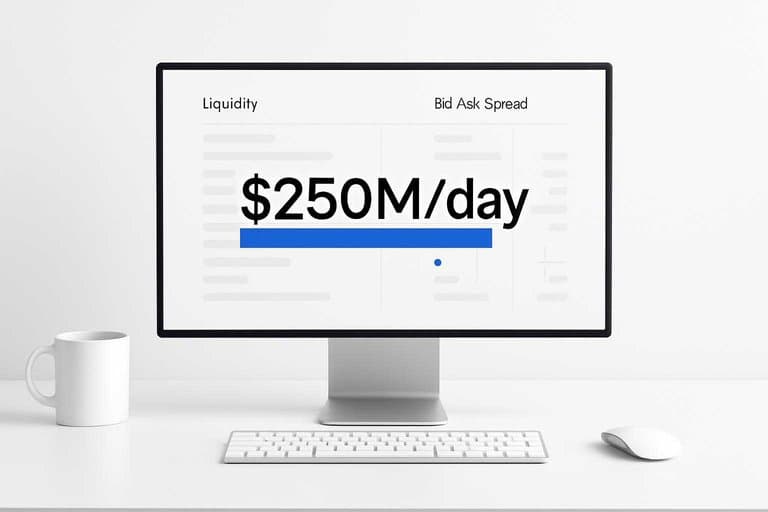
Liquidity is your trade’s plumbing. If it’s small, you pay with slippage and bad fills.
| Account size | Timeframe | Min avg volume | Min $ volume | Max spread |
|---|---|---|---|---|
| $1k–$10k | Swing (days) | 500k shares | $10M/day | 0.30% |
| $1k–$10k | Intraday | 2M shares | $30M/day | 0.15% |
| $10k–$100k | Swing (days) | 1M shares | $25M/day | 0.20% |
| $10k–$100k | Intraday | 5M shares | $100M/day | 0.10% |
| $100k+ | Intraday | 10M shares | $250M/day | 0.05% |
If a ticker fails this gate, remove it fast and spend your attention on cleaner auctions.
Filter 3: Price Band
A price band is the fastest way to turn “too many charts” into a watchlist you can execute. It cuts bad fills, reduces sizing math, and keeps your risk model consistent.
Pick your band
Pick a min and max price that matches your account size and your order style.
- Small account: set $5–$50, and avoid anything under $2.
- Mid account: set $10–$150, and avoid anything under $3.
- Large account: set $20–$300, and avoid anything under $5.
- Add a penny-stock rule: exclude sub-$1, low-volume, and frequent reverse splits.
- Adjust for your broker: raise the minimum if fees or routing are worse.
You’re buying execution quality, not just a prettier watchlist.
Common band mistakes
Most price bands fail because they ignore how your orders really fill.
- Setting a band so wide it hides liquidity problems.
- Ignoring ADR, then getting chopped by “normal” moves.
- Splitting capital across bands, then under-sizing every trade.
- Changing share size rules week to week.
- Mixing optionable and non-optionable tickers.
Your band should simplify decisions under pressure, not add a second sizing system.
Verification check
Do two quick checks before you lock the band. First, confirm your usual position size fits your risk per trade without odd lot math. Second, scan average spread and keep it under your max, like “$0.02 on a $20 stock.”
If spreads break your limit, raise the minimum price or tighten the universe.
Filter 4: Volatility Clamp
You want movement you can plan around, not candles that feel like roulette. Use ATR% or ADR% to keep names that move enough to pay you, without blowing up your sizing.
Set ATR% range
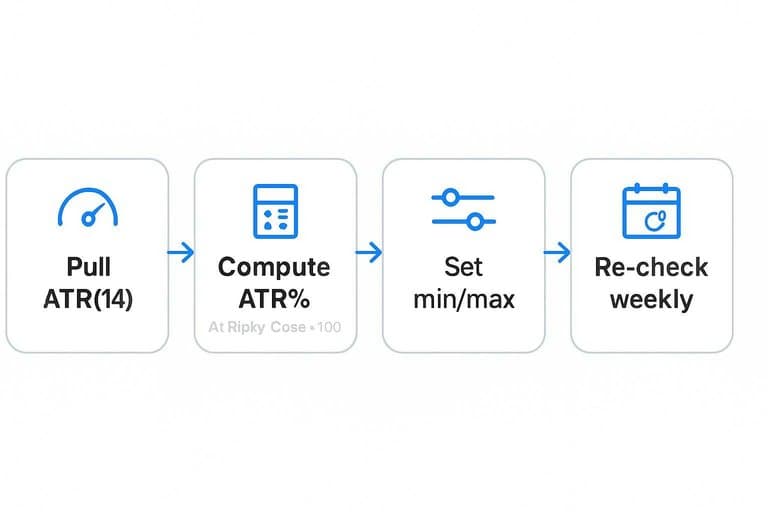
Compute ATR% so you compare movement across prices, not by vibes.
- Pull ATR(14) and today’s close.
- Compute ATR% = ATR(14) / Close × 100.
- Set a minimum so moves clear your costs.
- Set a maximum so stops stay sane.
- Re-check weekly, or after big regime shifts.
Start here: swing trades 2–6% ATR%, day trades 0.7–2.5% ATR%. For a quick definition and background, see Average True Range (ATR).
Volatility red flags
Some volatility is tradable; some is pure event risk.
- Trades with frequent overnight gaps
- Moves on headlines, not flow
- Sits in earnings week
- Shows halts in recent history
- Prints thin premarket volume
If you see two or more, treat it like an event, not a setup.
When to loosen
Widen your ATR% bands during high-volatility regimes, but cut size so dollars-at-risk stays constant.
Filter 5: Trend Alignment
You’re not scanning for “good stocks.” You’re scanning for stocks that agree with your timeframe. Mixed trends create mixed decisions, and those cost you money.
Choose trend proxy
Pick one trend proxy per strategy, or you’ll argue with your own filter. The goal is consistency, like always using the same ruler.
| Proxy | Best for | Strength | Common pitfall |
|---|---|---|---|
| 20/50/200 MA | Position trades | Clear structure | Late on turns |
| Higher highs/lows | Swing trades | Price-first | Subjective calls |
| Regression slope | Systems | Quantified trend | Noisy on gaps |
Once you lock a proxy, you stop “seeing” trends and start measuring them.
Apply alignment rule
Your rule should be binary enough to run fast, but strict enough to avoid debate. Define it once, then apply it everywhere.
- Define up, down, and flat in your proxy.
- Set a lookback window that matches your holding period.
- Check the trend on your trading timeframe first.
- Require confirmation on one higher timeframe.
- Exclude anything labeled flat.
Two timeframes agreeing is the difference between trend trading and trend tourism.
Avoid trend traps
Chop is where trend filters lie to you, especially after big news spikes. You’ll get a “sort of uptrend” on one proxy and a “barely downtrend” on another.
Treat mean-reversion regimes as a separate game, not a weaker version of your trend game. If your proxy says “flat,” cut it and move on.
Run the 7-Filter Reset in 15 Minutes
- Start with triage: name your overload symptom, diagnose the likely root cause, and commit to applying just one filter first.
- Apply Filters 1–6 in order, cutting ruthlessly at each gate; if a stock fails, it’s out—no “maybe” list.
- Save the survivors as your new core watchlist and label each by the rule it passed (universe, liquidity, price, ATR%, trend).
- Re-run the checklist weekly and only add new names that clear every filter, so your list stays small, liquid, and aligned with your setup.
Frequently Asked Questions
Why do I see too many stocks in my screener even after setting basic criteria?
Most screeners default to a huge universe (all U.S. equities, all market caps, all sectors), so “basic criteria” still returns thousands. Tighten the universe plus add one catalyst or setup constraint (e.g., earnings date window, relative volume, or a specific pattern) to cut results fast.
Does “see stocks” mean the same thing as stock screening or scanning?
Usually it’s used interchangeably, but screening is typically static filters (fundamentals/price/volume) while scanning is event-driven (new highs, breakouts, unusual volume). If you “see stocks” all day, a scan with alerts often reduces decision fatigue versus re-running screens.
How many stocks should I aim to see per day after filtering?
Most traders do best with a shortlist of 10–30 names per session and a watchlist of 50–150 total. If you’re seeing more than that, add a “top N” sort (by relative volume, % change, or volatility) to force prioritization.
How do I measure whether my filters are actually improving my results?
Track hit rate, average R-multiple, and maximum adverse excursion (MAE) on a 20–50 trade sample before and after changes. If your filters are working, you’ll usually see fewer trades but higher average R and lower MAE per setup.
What can I do if I don’t have a paid scanner but still want to stop seeing too many stocks?
Use free tools like TradingView’s screener plus alerts, Finviz for quick narrowing, and your broker’s basic filters to build a capped watchlist. The key is limiting the universe and then sorting by one priority metric (e.g., relative volume) instead of scrolling endless results.
Turn Filters Into Watchlists
These triage steps and filters reduce the noise, but keeping them consistent across thousands of stocks is the real bottleneck after the close.
Open Swing Trading streamlines stock selection with daily relative strength rankings, breadth and sector rotation context, and watchlist workflows—so you spot potential breakout leaders faster using your own charts.
Sources
- Wikipedia — Average True Range (ATR) definition and origin (Wilder) — referenced in Set ATR% range