Set up a market breadth dashboard in 30 minutes
A step-by-step guide to building a market breadth dashboard in under 30 minutes—pick a lightweight tooling stack, ingest and schedule breadth data, model core indicators in SQL, design Grafana panels, and wire up alerting/sharing without overengineering.
Set up a market breadth dashboard in 30 minutes
A step-by-step guide to building a market breadth dashboard in under 30 minutes—pick a lightweight tooling stack, ingest and schedule breadth data, model core indicators in SQL, design Grafana panels, and wire up alerting/sharing without overengineering.
Market breadth is one of the fastest ways to spot “what’s really happening” under the index—until you’re juggling CSVs, stale screenshots, and indicators that don’t line up by timestamp.
In the next 30 minutes, you’ll stand up a simple, repeatable dashboard that pulls breadth data on a schedule, computes the key indicators correctly, and visualizes them in Grafana with sensible filters. You’ll also add alerts and sharing so your breadth view becomes operational—not just a one-off chart.
Tooling stack
You’re building a breadth dashboard, not a data lake. Pick tools that ship in one sitting, then swap pieces later.
A workable stack is: one breadth feed, one place to store it, one dashboard, and one small transform step.
Data sources
You need breadth inputs that update daily and map cleanly to your watch universe. Start with one primary feed, then add a proxy when coverage is messy.
- Exchange advances/declines (NYSE, Nasdaq)
- Up/down volume (by exchange)
- New 52-week highs/lows (by exchange)
- Index constituents (S&P 500, Nasdaq 100)
- ETF proxies (SPY, QQQ, IWM)
If you can’t tie breadth to your tradable universe, your signals stay academic.
Storage choice
Your storage choice is really a refresh-frequency decision. If you refresh daily, keep it boring and local.
Postgres fits scheduled refresh and multi-user queries. DuckDB fits single-user, fast local analytics. Sheets fits “good enough” demos and manual updates, like a shared “truth tab.”
Dashboard layer
Pick a dashboard that matches how you share and how you alert. If it can’t handle your access model, it will stall adoption.
| Tool | Auth | Sharing | Alerts |
|---|---|---|---|
| Grafana | Strong | Team-friendly | Built-in |
| Metabase | Good | Simple links | Basic |
| Looker Studio | Easy embeds | Limited |
Choose the layer that matches your “who needs access” reality, not your feature wishlist.
Compute glue
You’re stitching sources into a few ratios and rolling sums. Use the smallest tool that can run on a timer.
Python + pandas is fastest when APIs are messy. SQL-only transforms are fastest when data is already tabular. dbt pays off when you expect more models and teammates soon.
Create the workspace
You need two things first: a dashboard app and a database that won’t surprise you later. Think “one command up, one query verified,” like saying, “If this breaks, it breaks loudly.”
Quickstart via Docker
Get Postgres and Grafana running fast, with data saved to disk.
- Create a
docker-compose.ymlwithpostgresandgrafanaservices. - Map ports:
5432:5432for Postgres and3000:3000for Grafana. - Add named volumes for
/var/lib/postgresql/dataand/var/lib/grafana. - Run
docker compose up -dand confirm both containers are healthy. - Open
http://localhost:3000, then log in with the admin credentials.
If you don’t mount volumes, you’re building a demo, not a dashboard.
Secrets and config
Decide your runtime settings once, then stop touching them.
- Set
DB_PASSWORDfor Postgres auth. - Set
API_KEY_*values for your data sources. - Set
TZfor consistent timestamps. - Set
REFRESH_INTERVALfor ingestion cadence. - Document everything in a
.envfile.
The goal is boring repeatability, not clever configuration.
Connectivity check
Prove the dashboard tool can talk to your database before you build anything.
- Add a Postgres data source in Grafana (or Metabase) using your container hostname.
- Set database name, user, and password from your
.envvalues. - Click “Save & Test” and confirm the connection succeeds.
- Run
SELECT now();and confirm a timestamp renders. - Run
SELECT 1;and confirm a single value panel appears.
If SELECT 1 fails, every chart you make is pretend.
Folder structure
Create a small structure that keeps “fetch,” “transform,” and “present” from tangling. Use /ingest for API pulls, /models for SQL transforms, /dashboards for exports and JSON, and /scripts for one-off utilities.
When your breadth signals drift, this layout tells you where to look first.
Ingest breadth data
You only need one reliable feed and a repeatable load job. Treat this like plumbing, not research. If the data lands daily, your dashboard stays honest.
Minimal dataset
Start with daily counts and volumes that let you compute the classic breadth ratios. Pick one venue first, like “NYSE” or “SPX constituents,” and stay consistent.
- Advances
- Declines
- Unchanged
- Up volume
- Down volume
If you can’t get this stable, everything downstream becomes guesswork.
A practical MVP source is the daily market diary tables for venues like NYSE/NASDAQ that map directly to adv/dec/unch and volume fields.
Ingestion script
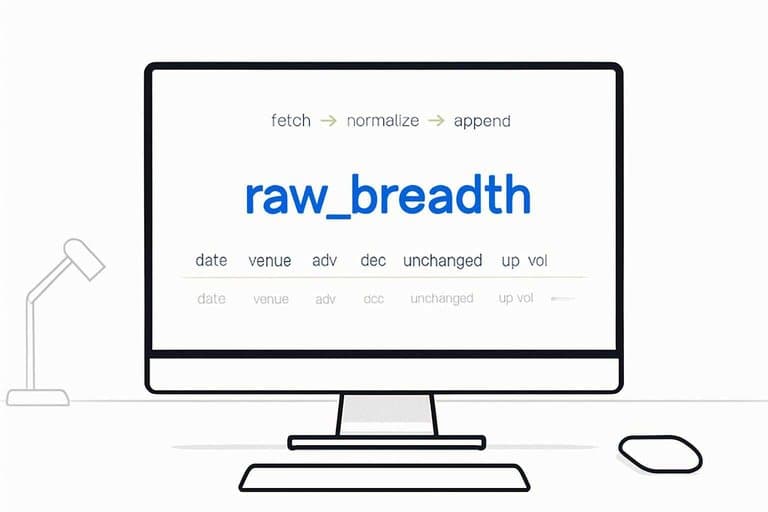
Write one script that does three jobs: fetch, normalize, append. Keep it boring, and keep it idempotent.
- Request the day’s breadth data from your provider API.
- Normalize field names to your canonical schema.
- Coerce types and fill missing fields with nulls.
- Upsert into raw_breadth by (date, venue).
- Exit non-zero and log the payload on failures.
A clean exit code is your first alerting system.
Schema and types
Define a single raw table that matches the provider fields, not your indicators. Use date and venue as your natural key.
Example:
- date: DATE
- venue: TEXT
- adv, dec, unchanged: INTEGER
- up_vol, down_vol: BIGINT
- nh, nl: INTEGER
Primary key: (date, venue). Index venue for fast filtering, and date for range scans. The dashboard will feel instant when your queries stop doing full-table walks.
Scheduling
Schedule the job where you already deploy code, and make failures loud. Daily after the market close is the default.
- Run via cron or GitHub Actions on a fixed weekday schedule.
- Parameterize venue and date to support backfills.
- Write logs to a file or job artifact for debugging.
- Fail the run on non-zero exit codes.
- Notify via email or Slack on repeated failures.
If ingestion doesn’t page you, your dashboard will quietly lie.
Model breadth indicators
Raw fields are noisy until you turn them into a few boring, repeatable indicators. Model them once, then every chart and alert uses the same math.
Example: store “ad_net” and “ud_vol_ratio” as columns, not ad-hoc query snippets.
Core formulas
Use consistent names and divide-safe math so charts never break on zero days.
| Indicator | Formula | Notes | Output |
|---|---|---|---|
| A-D net | adv - dec | nulls to 0 | ad_net |
| A-D ratio | adv / dec | dec=0 safe | ad_ratio |
| U/D vol ratio | up_vol / down_vol | down=0 safe | ud_vol_ratio |
| NH-NL net | new_highs - new_lows | nulls to 0 | nh_nl_net |
| McClellan inputs | ad_net EMA19/39 | use close dates | mcc_osc_input |
Once these are columns, alerting becomes a filter, not a spreadsheet ritual.
SQL models
Build three small models so each layer has one job and one grain.
- Create breadth_daily with one row per trading date.
- Create breadth_rolling with 10/20-day averages and EMAs.
- Create breadth_signals with boolean flags and threshold fields.
- Force deterministic dates by joining to your trading calendar.
- COALESCE null counts and volumes to zero before formulas.
If your dates are deterministic, your backtests stop “moving” between runs.
Quality checks
Breadth breaks silently when the grain drifts or a vendor slips a bad row.
- Check missing trading dates in breadth_daily.
- Check negative volumes in up_vol and down_vol.
- Check extreme ratios above your ceiling threshold.
- Check duplicate keys on (date, universe).
- Check nulls in required base fields.
Fail fast here, or you will debug charts instead of data.
Time alignment
Breadth is session-based, not clock-based, so your “date” must match the market session. If you ingest UTC timestamps, map them to the exchange timezone, then assign the trading date from your calendar table.
Holidays and half-days should come from a trading_calendar table, not hardcoded logic. That’s how you keep rolling windows from smearing across non-sessions.
Build dashboard panels
Your dashboard is only useful if it answers breadth questions in one glance. Build a small set of panels that refresh fast and read consistently, like a “traffic report” for participation and risk.
Aim for defaults that work on Mondays at 9:35 and Thursdays at 14:55. If you need to “interpret” every chart, you built research, not monitoring.
Panel set
Pick panels that map to the questions you ask out loud during a tape read. Keep each panel single-purpose, with one main metric and one clear unit.
- A–D line: cumulative participation trend
- A–D net bars: daily net thrust
- Up/down volume ratio: volume-weighted participation
- New highs–new lows: leadership pressure
- Rolling averages: smooth signal, reduce noise
If you can’t name the question per panel, cut it.
Grafana queries
Write each panel query so Grafana can reuse it across time ranges and filters. Validate on known dates, because “almost right” breadth is just wrong.
- Start with $__timeFilter(timestamp) and a venue WHERE clause.
- Add universe filters, then aggregate to the panel’s grain.
- Use window functions for cumulative lines and rolling means.
- Hard-check results on 2–3 sample dates you trust.
- Save each query as a panel template for reuse.
If the query can’t survive a spot-check, it won’t survive live trading.
Layout and UX
Arrange panels in the order you think, not the order you built them. Put trend first, then participation, then risk, so your eyes flow from “where” to “how broad” to “how fragile.”
Use annotations for known shocks, like “CPI 08:30” or “FOMC 14:00.” Keep units consistent, so “+200” never competes with “0.8x.”
Good layout turns breadth into reflex, not analysis.
Variables and filters
Variables keep you from copying panels for every venue or universe. Design them so one query supports many views, without rewriting SQL.
- Add variables for venue and index universe, backed by distinct table values.
- Add timeframe controls using Grafana’s time picker, not custom SQL.
- Add a smoothing window variable, like 5, 10, 20.
- Reference variables in SQL filters and window frames.
- Test combinations that often break, like “All venues” plus long lookbacks.
When variables work, the dashboard scales with your curiosity.
Alerting and sharing
Alerts turn a dashboard into a habit, not a weekend project. A simple rule like “email me when participation breaks” keeps you honest on busy days.
Signal thresholds
Pick thresholds that match how you actually trade and review risk. Use plain rules you can explain in one breath.
- Alert when A/D ratio drops below X
- Alert when NH–NL falls below Y
- Alert on volume ratio divergence vs price
- Alert on 50/200 MA crossover
Write the rule in human terms first, then encode it.
Alert plumbing
Route alerts where you will see them within minutes. Then make the system quiet on purpose during planned noise.
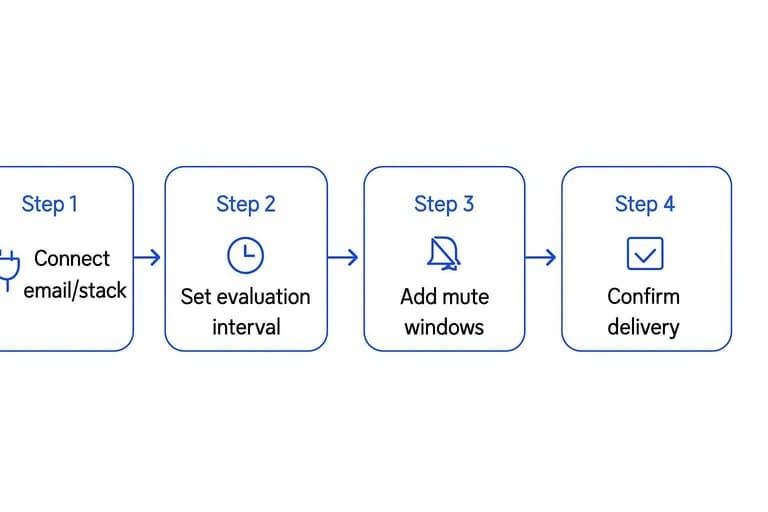
- Connect email, Slack, or a webhook receiver.
- Set an evaluation interval that matches your bar size.
- Add mute windows for market open, holidays, or maintenance.
- Force a low threshold to trigger, then confirm delivery.
If you don’t test delivery, you don’t have alerts.
Access controls
Sharing is easy until someone edits panels or sees a datasource they shouldn’t. Decide who can view, who can edit, and who can query raw data.
Give viewers read-only roles, and reserve edit rights for one owner. Share via a link or embed, but restrict datasource permissions. Rotate API keys on a calendar, not after an incident.
Runbook
When an alert fires, you need a playbook, not a debate. Keep it short and executable.
- Rerun ingest for the latest window and confirm row counts.
- Backfill missing dates, then recheck the time range.
- Check logs for parser errors, timeouts, and rate limits.
- Restore the DB from the last known good snapshot.
- Validate panel queries with known “good” symbols.
A two-minute runbook beats a perfect postmortem.
30-minute checklist
Set a timer and ship a first version. Your goal is a working breadth dashboard, not a perfect one.
- Pick 1 universe and timeframe, like “S&P 500 daily.”
- Pull OHLCV for all tickers and align dates before anything else.
- Compute 3 breadth signals: % above 50DMA, A/D line, 20-day new highs-lows.
- Build 4 tiles: signal values, 1 sparkline each, and a simple risk band.
- Save and schedule refresh, then screenshot and write one line: “Risk on/off because ____.”
If you can’t explain the last line, you built a chart gallery, not a decision tool.
Validation: make sure your dashboard isn’t lying
Before you trust alerts or act on a “breadth break,” prove your pipeline produces plausible values. This is the missing step that keeps a market breadth dashboard from becoming a confident source of wrongness.
Sanity checks you can run in 60 seconds
Use quick checks that tell you “the world still makes sense” without debating indicators.
- Row completeness: today’s session exists for each venue/universe you track.
- Bounds: adv/dec/unch are non-negative; volumes are non-negative.
- Identity checks: adv + dec + unchanged is not zero on normal sessions.
- Reasonable ratios: guardrails so ad_ratio and ud_vol_ratio don’t explode on tiny denominators.
If any one of these fails, mute signal alerts and treat the issue as ingestion/modeling, not market behavior.
A minimal validation query set
Keep a few queries you can paste into your SQL console (or a Grafana table panel) whenever something looks off.
- Missing dates (by venue): compare your trading_calendar against breadth_daily.
- Duplicate keys: confirm one row per (date, venue) in raw and modeled tables.
- Null and negative checks: required fields present; no negative volumes.
- Denominator traps: count days where dec=0 or down_vol=0 and decide how you want to render them (null, capped, or special-case).
The point isn’t perfection—it’s to detect “this is a data artifact” before it becomes a narrative.
Make data freshness visible
Add one tiny “status” tile to the top of the dashboard so you can see pipeline health at a glance.
- Latest ingested trading date (per venue)
- Ingest lag (latest expected trading date vs latest available)
- Last successful job timestamp (from your scheduler logs or a simple run_history table)
A freshness tile prevents the most common failure mode: acting on yesterday’s breadth as if it’s today’s.
Common pitfalls
Most breadth dashboards fail for boring reasons. Data joins, timezone drift, and charts that lie.
| Pitfall | Symptom | Quick fix | Check |
|---|---|---|---|
| Mixed timezones | Open misaligns | Convert to exchange tz | Compare first bar |
| Bad symbol mapping | Missing tickers | Normalize keys, dedupe | Count before/after |
| Corporate actions ignored | Sudden breadth spikes | Adjust prices, use total return | Spot split dates |
| Partial day data | Breadth collapses midday | Filter by session completeness | Bars per day |
| Wrong y-axis scaling | “Flat” AD line | Use separate axis, normalize | Zero line visible |
If your chart looks “too clean,” you probably filtered away the market.
Ship the dashboard, then tighten the loop
Once your panels render and your models pass basic quality checks, treat this as a first deploy: lock in the schedule, verify time alignment on a volatile day, and set initial alert thresholds that you can tune after a week of observations. Share a read-only link with your team, attach a short runbook to each alert (what it means, what to check, what to do), and log any false positives as candidates for better filters or data hygiene. From there, your breadth dashboard becomes a living system—easy to maintain, hard to misread, and ready to expand with additional universes or indicators when you need them.
Turn Breadth Into Watchlists
Once your market breadth dashboard is live, the real edge comes from applying it daily to spot leadership and confirm regime shifts before you pick charts.
Open Swing Trading pairs breadth context with daily RS rankings, sector/theme rotation, and watchlist workflows so you can find breakout leaders faster—get 7-day free access with no credit card.
Sources
- Market Diaries (Investcom) — daily totals incl. volume, advancers/decliners/unchanged for NYSE/NASDAQ/AMEX/TSX — referenced in Ingest breadth data