Set Up a Swing Trading Scanner for 5,000 Stocks
A step-by-step guide to building a swing trading scanner that reliably covers ~5,000 stocks—choose a tooling stack, assemble a clean data universe, design a batch compute engine, implement liquidity/trend/risk filters, and rank outputs into watchlists with alerting, backtests, and deployment checks.
Set Up a Swing Trading Scanner for 5,000 Stocks
A step-by-step guide to building a swing trading scanner that reliably covers ~5,000 stocks—choose a tooling stack, assemble a clean data universe, design a batch compute engine, implement liquidity/trend/risk filters, and rank outputs into watchlists with alerting, backtests, and deployment checks.
If your scanner works on 200 tickers but falls apart at 5,000—slow runs, missing data, random false positives—you don’t have a “strategy” problem. You have a systems problem.
This guide walks you through a scalable, repeatable scanner setup: how to build the symbol universe, normalize adjusted price data, batch-compute indicators efficiently, apply core liquidity/trend/risk filters, and turn the results into ranked watchlists with alerts. You’ll also learn how to backtest the scanner and ship a minimal working version before you optimize.
Scanner Blueprint
Your scanner needs one job: surface swing setups across 5,000 tickers without missing a daily bar. Pick a holding window first, like “3–15 trading days,” then design filters that match it. If you can’t say what you buy and when you exit, your filters will drift.
Tooling Stack
You’re building a pipeline, not a chart. Each piece exists to keep 5,000 symbols updated, ranked, and tradable.
- Broker + API for orders, positions, and buying power
- Market data vendor for reliable EOD bars and corporate actions
- Charting platform for visual review and annotations
- Scripting language for scanning, ranking, and backtests
- Scheduler + storage for daily runs and cached history
If any piece is “manual,” it becomes your bottleneck at scale.
System Architecture
A swing scanner is an assembly line. You want every step logged, repeatable, and restartable.
Universe → daily ingest → adjust bars → compute indicators → score/rank → build watchlist → send alerts → open order tickets.
Run ingest and indicator jobs on a server, then push results to your charting and broker tools. If ranking and alerts don’t run headless, they won’t run on time.
Cost And Limits
Limits hit first when you scan thousands of symbols. Plan for the ceiling, not the marketing page.
- Quotes rate limits: 5–50 requests/second typical
- Historical caps: 1–10 years per call common
- Symbol limits: 500–5,000 per plan frequent
- Websocket limits: 50–500 streams typical
- Corporate actions: often paywalled or delayed
Cache daily bars, batch requests, and retry with backoff. Otherwise you’ll “pass” on trades because you never saw the signal.
Universe And Data
Your scanner is only as trustworthy as its symbol list and price history. A survivorship-safe universe plus correctly adjusted OHLCV keeps signals from turning into hindsight.
Example: if a stock split and your chart didn’t, your “breakout” was a math error.
Symbol Universe Build
You need a repeatable universe, not a moving target. Build snapshots so every backtest can recreate “what you knew then.”
- Pull listings from primary exchanges plus eligible ADRs.
- Exclude OTC, pink sheets, and halted tickers.
- Filter by liquidity: price, dollar volume, and trade frequency.
- Store a dated universe snapshot with source and rules.
- Version changes when filters or sources change.
If you can’t recreate last month’s universe, you don’t have a scanner. You have a story.
Data Vendor Setup
Pick one vendor for truth, then wire it cleanly. You want stable endpoints, explicit permissions, and fields that survive corporate actions.
Configure:
- Credentials and rate limits
- EOD and 1H endpoints
- Symbol mapping endpoint
- Corporate actions endpoint
- Trading calendar and sessions
Required fields:
- OHLCV per bar
- Split factors
- Dividend amounts
- Session open/close times
A vendor without a proper calendar will quietly corrupt your 1H bars. That’s the bug that looks like “edge.”
Storage Layer
You’re querying indicators across 5,000 symbols. The schema and indexes decide if scans run in seconds or minutes.
- Create tables for bars, actions, symbols, and universe snapshots.
- Partition bars by date or by symbol, depending on your scan pattern.
- Add composite indexes: (symbol, timestamp) and (timestamp, symbol).
- Store vendor payload hashes for dedupe and audit.
- Enforce constraints: no gaps, no duplicates, valid sessions.
Fast scans come from boring database choices. Boring ships.
Adjustment Rules
Decide one adjustment policy and apply it everywhere. Otherwise, your indicators won’t match your fills, and your results won’t replicate.
Rules to define:
- Adjusted vs unadjusted OHLCV for signals
- Split handling: retroactive price and volume scaling
- Dividend handling: total-return adjustment or leave raw
- Recompute indicators after actions or vendor revisions
- Symbol changes: map old→new, keep a stable internal ID
- Delistings: keep last bars, mark inactive, keep universe history
If corporate actions can change yesterday’s candles, your pipeline needs recalculation triggers. Automation beats detective work.
Compute Engine
Your scan is a math problem at scale, not a charting problem. If you compute indicators efficiently and cache aggressively, 5,000 symbols becomes routine. Think “daily batch job,” not “click-and-wait.”
Python Environment
You want one clean environment you can recreate on any machine. Pinning versions prevents a “worked yesterday” failure after an update.
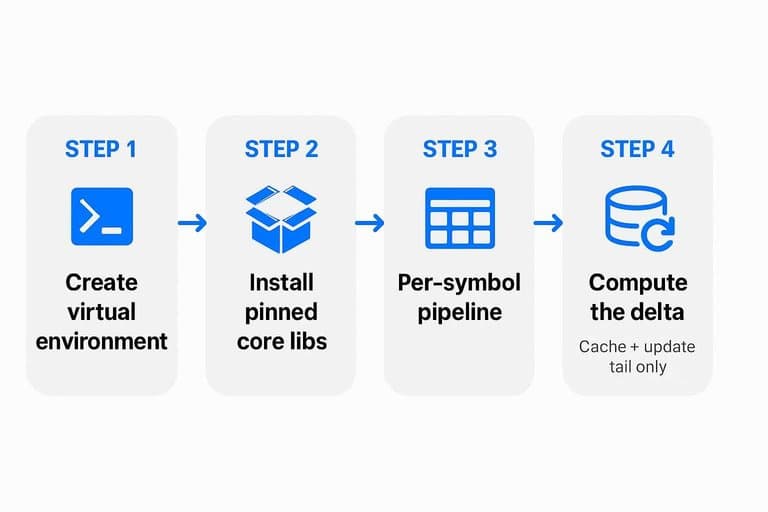
- Create a virtual environment:
python -m venv .venvand activate it. - Upgrade packaging tools:
python -m pip install -U pip setuptools wheel. - Install pinned core libs:
pip install pandas==2.2.2 numpy==1.26.4 sqlalchemy==2.0.30. - Install indicators:
pip install pandas-ta==0.3.14b0orpip install TA-Lib==0.4.28. - Install a scheduler:
pip install apscheduler==3.10.4or use system cron.
Lock it in with a requirements.txt or pip-tools before you touch performance. That’s your baseline.
Batch Processing Design
Your fastest path is vectorized math on arrays, then minimal Python overhead. The design choice is simple: more RAM for fewer passes, or less RAM for more batches.
Run a per-symbol pipeline that loads bars into a DataFrame, computes indicators with vectorized ops, and writes results once. Chunk symbols into batches, like 100–500 at a time, to cap memory spikes. Parallelize across symbols with processes, not threads, because NumPy and TA code may release the GIL inconsistently.
If your machine thrashes swap, drop chunk size first. Speed comes from steady throughput, not peak concurrency.
Cache Strategy
You don’t want to recompute 200-day indicators for 5,000 symbols every run. Cache the computed columns, and only update the tail when new bars arrive.
- Persist indicator outputs per symbol and timeframe in a local DB or Parquet.
- Store metadata: last bar timestamp, indicator params, and source data hash.
- On each run, load cached tail, then compute only missing rows.
- Invalidate when bars change: splits, dividends, symbol remaps, or vendor corrections.
- Keep a “rebuild” switch for forced full recompute during audits.
A cache turns “compute everything” into “compute the delta.” That’s how modest hardware feels fast.
Core Scan Filters
Your baseline swing scan needs fewer opinions and more gates. Think “can I trade it,” “consider the trend,” then “can I survive the trade.” Keep every threshold in one config file so you can change behavior without rewriting code.
Liquidity Gates
Liquidity filters stop your scanner from finding trades you can’t execute. They cut slippage, reduce bogus breakouts, and keep backtests honest.
Use simple proxies you can compute fast:
- Minimum dollar volume:
close * volumeover 20 days - Minimum price: avoid penny spreads and halts
- Spread proxy: reject high
high-lowpercent bars - Optional: exclude “news spike” volume days
If a symbol fails liquidity, it’s not a setup. It’s a trap.
Trend And Pullback
You want trend alignment plus a controlled pullback. Compute indicators once, then produce pass or fail flags per symbol.
- Compute SMA20, SMA50, and SMA200 from daily closes.
- Compute ATR14 using true range, then store
atr_pct = ATR14 / close. - Set trend pass when
close > SMA50andSMA50 > SMA200. - Set pullback pass when
close < SMA20andclose > SMA50. - Output daily flags like
liq_ok,trend_ok,pullback_ok,atr_ok.
Once you have flags, ranking is easy. Filtering is the hard part.
Risk Constraints
A scan that ignores risk will hand you “perfect” setups that blow up accounts. Store sizing inputs and derived columns in your dataset.
- ATR stop distance:
stop = entry - k * ATR14 - Max percent risk:
risk_dollars = equity * max_risk_pct - Max gap risk:
gap_loss = shares * (open - stop) - Size formula:
shares = floor(risk_dollars / (entry - stop)) - Hard cap:
max_position_dollarsormax_shares
If your scanner can’t size the trade, it shouldn’t recommend the trade.
Config File Layout
Put every threshold and toggle in one config file. It keeps scans repeatable, and experiments clean.
Here’s a simple YAML layout:
universe:
  min_price: 5
  min_dollar_vol_20d: 20000000
  max_range_pct_1d: 8

indicators:
  sma_fast: 20
  sma_mid: 50
  sma_slow: 200
  atr_len: 14

filters:
  require_uptrend: true
  require_pullback: true
  pullback:
    max_close_above_sma20_pct: 0

risk:
  atr_stop_k: 2.0
  max_risk_pct: 0.005
  max_gap_risk_pct: 0.01
  max_position_dollars: 25000

outputs:
  write_flags: true
  write_stops_and_size: true
Change the file, rerun the scan, and compare results. That’s how you learn fast without drifting.
Ranking And Watchlists
Pass/fail filters get you to “tradable.” Ranking gets you to “best today.” You’ll turn each signal into a composite score, then ship a short list into TradingView and your broker.
Scoring Model
You need one number per stock so your watchlist sorts itself. The trick is comparing names across sectors without favoring naturally volatile groups.
- Compute component scores for trend, pullback, volume, and volatility.
- Normalize each component by sector using z-scores or percentiles.
- Weight components, like Trend 40%, Pullback 20%, Volume 25%, Volatility 15%.
- Cap extremes and rescale to 0–100 for clean ranking.
- Re-rank daily, then keep the top N per sector.
Outputs And Exports
Export is where good scans go to die, unless you standardize columns. Pick formats your tools ingest without manual cleanup.
- CSV: symbol, score, sector, setup_date, entry, stop, target.
- TradingView watchlist: symbol, score, note, alert_price.
- Broker watchlist: symbol, exchange, quantity_hint, stop_price.
- Webhook JSON: symbol, score, timeframe, entry, stop, metadata.
Schedule The Run
Run after the close for clean daily bars and stable rankings. Run premarket if you trade the open and accept incomplete volume.
After-close scans use final OHLCV, so volume expansion and close-based trend signals are accurate. Premarket scans can miss the day’s true close and distort volatility, but they give earlier alerts for gap plans. If you schedule both, label them clearly: “EOD official” versus “Premarket early.”
Alerting Pipeline
Alerts are where your scanner becomes a decision tool, not a noisy dashboard. You want signals only when rank, timing, and price action line up, with enough context to act fast.
Alert Rules
Use rules that combine quality, recency, and a clear trigger, or you will alert on everything.
- Set a rank threshold, like “rank ≤ 50,” and require minimum liquidity.
- Enforce freshness, like “signal age ≤ 2 bars” or “updated today.”
- Add a trigger, like “breaks prior 20-day high” or “crosses breakout level.”
- Store state per symbol, like last_alerted_at and last_trigger_price.
- Suppress repeats, like “no re-alert for 3 days unless new high.” That state file is your noise filter, and it compounds fast.
Delivery Channels
Pick channels you will actually check during market hours, then standardize the payload.
- Email via SMTP or SendGrid, with subject using ticker and rank.
- Slack or Discord via webhook URL, with a JSON message body.
- SMS via Twilio, with short text and a chart link.
- Telegram bot, with chat_id and formatted markdown.
- Include fields: ticker, rank, trigger, price, time, link. If your message lacks the “why now” fields, you will hesitate and miss fills.
Observability Basics
You need simple telemetry so alerts fail loudly, not silently. Log every scan run with a run_id, start time, end time, and symbol count. Capture alert decisions too, like “AAPL suppressed: alerted 2d ago.” Add retries for transient failures, like webhook 429 or DNS timeouts. Send error notifications to a separate channel, like “scanner-errors” in Slack. Keep a small dashboard showing scan duration, failures by type, and missing-data warnings. When you can see bottlenecks and gaps, you can trust the alerts enough to trade them.
Backtest The Scanner
Backtest your scan rules so you know the edge is real, not a lucky month. Tie every result to a named config like “EOD_Scan_v12_ATRstop_1p8”. If you can’t reproduce it, you can’t trust it.
Backtest Tool Choice
Pick a tool that matches end-of-day signals and a 5,000-stock universe. You want fast vectorized runs, clean assumptions, and reproducible configs.
| Tool | Best for | Strength | Watch-outs |
|---|---|---|---|
| vectorbt | EOD factor rules | Very fast | Memory tuning |
| backtrader | Event-driven logic | Realistic orders | Slower at 5k |
| Custom pandas | Simple prototypes | Full control | Easy to lie |
If you’re EOD scanning 5,000 symbols, start with vectorbt and only go event-driven when rules demand it.
Signal To Trade
Turn a “signal” into a trade with explicit execution rules. Ambiguity is where fake performance hides.
- Define entry as next-day open after a close-based signal.
- Define exit as stop, target, or time-based liquidation.
- Model stops and targets using ATR or percent bands.
- Add slippage as bps per trade and a per-share commission.
- Reject trades that violate liquidity and gap risk limits.
If you can’t write the assumptions in five lines, you’re not backtesting yet.
Validation Workflow
Use walk-forward splits so your thresholds earn the right to exist. Train on older data, then lock parameters and test out-of-sample.
Keep an anti-overfitting checklist: limit parameter ranges, cap the number of tuned knobs, require stability across market regimes, and rerun with costs doubled. If performance collapses under slightly worse assumptions, you found curve-fit comfort.
Deployment Checklist
Run your scanner like a job, not a hobby. You want repeatable runs, safe secrets, and clean upgrades.
Set this up once, then trust it daily.
| Area | Laptop | VPS | Cloud job |
|---|---|---|---|
| Scheduling | Task Scheduler/cron | systemd timer | Cron trigger |
| Environment | venv/conda | Docker image | Container |
| Secrets | .env + OS keychain | .env + permissions | Secret manager |
| Data storage | Local SQLite/Parquet | Postgres/volume | S3 bucket |
| Updates | Git pull weekly | Blue-green deploy | Versioned release |
If one row feels “optional,” that’s where your first outage starts.
Minimal Working Example
Build one working daily scanner first. Then add indicators and edge cases without breaking the pipeline.
- Ingest: download daily OHLCV for ~5,000 tickers into one partitioned table.
- Compute: generate features like ATR(14), 20/50 SMAs, and 20-day volume z-score.
- Filter: keep tickers with price > $5, dollar volume > $10M, and clean gaps.
- Rank: score candidates by trend strength, volatility contraction, and liquidity.
- Export and alert: write a CSV and send the top 25 via email or Slack.
If it doesn’t export and alert, it’s not a scanner yet.
Ship the first reliable version, then iterate with evidence
- Build the Minimal Working Example end-to-end: universe → adjusted OHLCV → core filters → ranked watchlist export.
- Lock the run schedule and observability: runtime, data freshness, missing symbols, and alert delivery checks.
- Backtest the scanner as a signal (not a full strategy), validate stability across regimes, then tune filters and scoring with versioned configs.
- Only after results are consistent, optimize cost/performance (caching, batching, storage) and expand alerts/channels.
Frequently Asked Questions
Do I need real-time data for a swing trading scanner, or is end-of-day enough?
End-of-day data is usually enough for most swing trading scanners because entries are typically planned after the close or for the next session. Use intraday (e.g., 1H) data only if your rules rely on intraday pullbacks, breakouts, or tighter alert timing.
How many stocks should a swing trading scanner track to get consistent setups?
Most traders get plenty of opportunities scanning 1,000 to 5,000 liquid U.S. stocks, which usually yields a manageable daily shortlist. If your scan returns too many names, tighten liquidity/volatility thresholds or increase ranking selectivity instead of shrinking the universe.
What scan frequency works best for a swing trading scanner—daily, hourly, or weekly?
Daily scans after the close are the standard for swing trading because they align with multi-day holds and reduce noise. Hourly scans are useful for time-sensitive alerts, while weekly scans work best for higher-timeframe trend-following setups with fewer signals.
Can I run a swing trading scanner with free tools instead of building one?
Yes—TradingView, Finviz Elite, TrendSpider, and TC2000 can replicate many swing trading scanner workflows with built-in filters and alerts. You usually trade off flexibility, survivorship-safe testing, and full control over ranking/exports compared to a custom build.
What results should I expect from a swing trading scanner if it’s working properly?
A working swing trading scanner should produce a repeatable daily shortlist (often 5–30 candidates) with stable signal rates and measurable backtested expectancy. In live use, expect variance week to week, but the key check is that performance stays within your backtest’s drawdown and win-rate ranges.
Turn Scans Into Watchlists
Building a swing trading scanner is only half the job—keeping data clean, rankings current, and alerts actionable across 5,000 stocks is the real grind.
Open Swing Trading delivers daily relative strength rankings, breadth and sector/theme context, and a fast watchlist workflow—so you can find breakout leaders without automated signals. Get 7-day free access with no credit card.