Stock Market Is Open but Quotes Frozen? 11 Fixes
A practical troubleshooting checklist for when markets are open but your stock quotes won’t move—verify whether data is truly frozen, distinguish delayed vs real-time feeds, reset sessions and connections, safely clear caches, and confirm data entitlements (subscriptions, agreements, account status).
Stock Market Is Open but Quotes Frozen? 11 Fixes
A practical troubleshooting checklist for when markets are open but your stock quotes won’t move—verify whether data is truly frozen, distinguish delayed vs real-time feeds, reset sessions and connections, safely clear caches, and confirm data entitlements (subscriptions, agreements, account status).
The bell rang, charts should be ticking, and yet your quotes are stuck like it’s the weekend. When the market is open but your app won’t update, it’s easy to waste time chasing the wrong cause—especially if you’re actually seeing delayed data or a single-symbol halt.
This checklist helps you define “frozen” precisely, cross-check against a second source, and work through the most common fixes in minutes: session refreshes, network resets, cache cleanup, and the account entitlements that silently block real-time streaming.
Confirm It’s Really Frozen
Quotes can look “frozen” even when the market is fine. You’re usually seeing a closed venue, delayed data, or a stale connection that stopped refreshing the tape.
Before you troubleshoot your whole setup, prove the basics with two quick checks and one precise definition.
Check market status
Confirm the market is actually trading for the ticker you’re watching, not just “the market” in general.
- Check today’s session hours for the exchange (open, close, pre, after-hours).
- Confirm the trading day isn’t a holiday, half-day, or special closure.
- Verify the ticker’s primary venue (NYSE, Nasdaq, ARCA, OTC, CME, crypto).
- Check the instrument type (stock, option, futures) for its own schedule.
- Look for trading halts or limit-up/limit-down messages on that symbol.
If the venue is closed or halted, your “freeze” is the correct behavior.
Spot delayed data
Many platforms default to delayed quotes, especially on free tiers or certain symbols.
- Look for a “15 min delay” badge near the quote.
- Check settings for “Real-time vs Delayed” market data.
- Confirm you accepted real-time exchange agreements, if required.
- Watch for OTC, foreign, or thin symbols lacking real-time coverage.
- Compare last trade time to your device clock.
If the timestamps lag by a fixed offset, it’s delay, not a freeze.
Compare a second source
One clean cross-check tells you whether the issue is your platform or the broader feed.
- Open a second source you trust (exchange site, broker app, or a major finance site).
- Match the exact symbol and venue (class shares, ADRs, futures month).
- Compare last trade time, bid/ask, and volume changes for 60 seconds.
- Check if only charts update, or only the quote pane updates.
- Repeat on one more symbol to rule out a single-instrument halt.
If other sources move and yours doesn’t, treat it as a platform-side problem.
Define “frozen” precisely
“Frozen” can mean several different failures, and each points to a different fix. For example, last price might change while bid/ask stays stuck, or charts move while your watchlist shows an old close.
Write down what stopped updating: last trade, bid/ask, volume, day range, chart candles, or only your watchlist tiles. Use specific language like “bid/ask stuck at 10:31” instead of “quotes frozen.”
The more exact the symptom, the faster you’ll land on the right lever to pull.
Fix 1: Refresh Data Session
A frozen quote screen usually means your app is stuck in an old data session. Force a new session without touching settings.
- Pull to refresh, then wait 10 seconds.
- Switch to a different ticker, then switch back.
- Toggle your watchlist sort, then return it.
- Close the quote screen, then reopen it from search.
- Force quit the app, then relaunch.
If quotes jump after step 2 or 3, your UI state was stale, not the market.
Fix 2: Reconnect Network
Quotes that load once but stop streaming usually point to a flaky connection, not a market halt. One minute you see prices, then they freeze like a paused video.
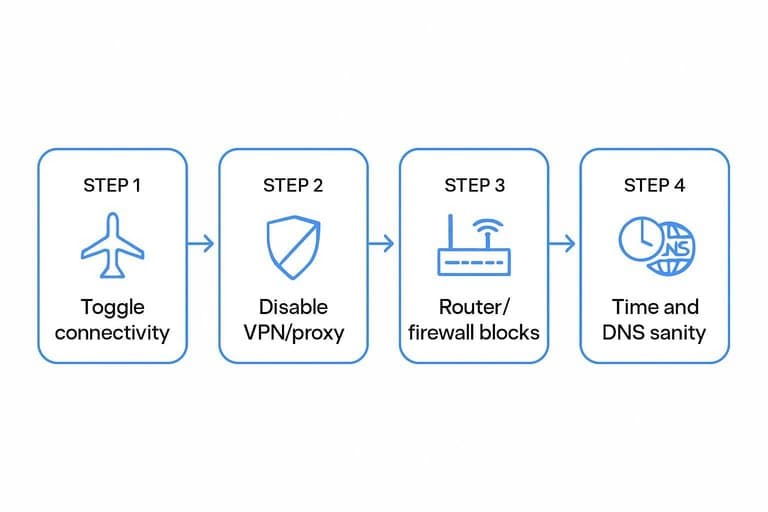
Toggle connectivity
Do this when streaming stalls but pages still open.
- Turn on Airplane Mode for 10 seconds.
- Turn Airplane Mode off and wait 15 seconds.
- Switch Wi‑Fi off, use cellular, then try the quotes again.
- Switch cellular off, use Wi‑Fi, then try again.
- Open another real‑time site to confirm live updates.
If the other live site also stalls, you’re chasing a network issue, not your broker.
Disable VPN/proxy
VPNs and proxies often break the “live” part of live quotes, even when the rest of the page loads. You’ll see partial loads, repeated reconnect spinners, or freezes after 10–60 seconds.
Quick test:
- Turn off your VPN/proxy.
- Reload the quotes page or restart the app.
- If it fixes the stream, switch to a different VPN region or split-tunnel your broker app.
If quotes work only with VPN off, your tunnel is blocking websockets or throttling sessions.
Router/firewall blocks
Some networks allow websites but block streaming quote connections. Corporate Wi‑Fi is the usual suspect.
- Try a phone hotspot on a different carrier.
- Disable “content filtering” or “family safety” features.
- Check for corporate firewall or proxy enforcement.
- Ask IT about websocket traffic and outbound restrictions.
- Test from a different network entirely.
If a hotspot fixes it instantly, your network policy is the freeze.
Time and DNS sanity
Bad device time and sticky DNS can break live connections in weird ways.
- Set Date & Time to “Automatic”.
- Confirm your time zone matches your location.
- Switch DNS temporarily to 1.1.1.1 or 8.8.8.8.
- Flush DNS or reboot your device.
When reconnects stop after a DNS change, your resolver was serving stale routing.
Fix 3: Reopen the App
Stuck quotes often come from a hung background process or a stale data session. A clean close and relaunch forces a fresh connection without changing your account.
- Save what you’ll lose first. Note unsaved chart drawings, draft orders, or edited watchlists.
- Force-quit the app (don’t just swipe away). iOS: open App Switcher and swipe the app up; Android: Recents then swipe away, or Settings → Apps → [App] → Force stop.
- Kill desktop leftovers if you’re on a computer. Windows: Task Manager → End task; macOS: Option+Cmd+Esc → Force Quit.
- Relaunch and wait 30–60 seconds on the quotes screen. Give it time to re-auth and reload the feed.
- Avoid “Log out” unless you must. Logging out can reset sessions and discard pending order drafts.
If the quotes jump to real time after a force-quit, the feed was stuck locally, not the market.
Fix 4: Clear Cache Safely
A frozen quote screen often comes from corrupted cached market data, not a broken market feed. Clear only the quote cache, not your saved login, so you avoid the “logged out everywhere” spiral.
Where cache usually lives:
- Web: your browser’s site data for the broker domain
- Mobile: the app’s cache in in-app settings or OS storage
- Desktop: the app’s local data folder under your user profile
Web cache reset
You want to purge bad site data for one domain, then force a fresh streaming session. Do it in a tight sequence so you can spot where it breaks.
- Hard refresh the quotes page (Ctrl/Cmd+Shift+R).
- Clear site data for the broker domain only.
- Close the tab, reopen, then log in again.
- Verify streaming resumes on a liquid symbol.
If a hard refresh fixes it, your cache was stale, not your account.
Mobile cache options
Mobile apps usually separate “cache” from “data,” and that distinction matters. Start with the least destructive option first.
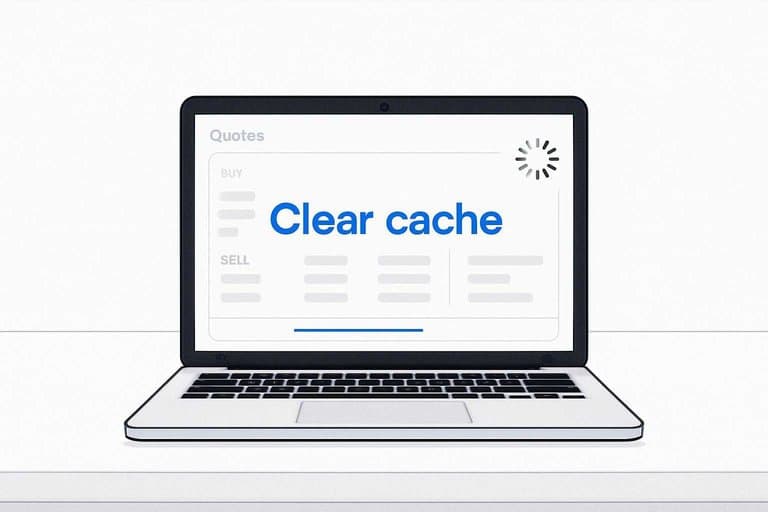
- Use the in-app “Clear cache” option.
- Clear cache in OS storage settings, not “Clear data.”
- Reinstall only as a last resort.
- Check offline downloads before clearing.
If your “fix” deletes offline files, you picked data wipe, not cache cleanup.
Desktop client cleanup
Desktop trading apps often cache quote snapshots, layouts, and watchlists in local folders. Clear the app cache folder first, then restart anything that streams data.
- Exit the desktop app completely.
- Remove the app’s cache/local data folder under your user profile.
- Restart the app and any helper services it installs.
- Rebuild indexes or re-sync watchlists if prompted.
If watchlists look empty, you cleared local indexes, not the server copy.
When not to clear
Skip cache clears when you have active orders, because you want the UI state stable. Avoid it during 2FA trouble or a shaky connection, because you can trigger lockouts and partial logins.
Clear later, on a stable network, when you can complete a clean re-login in one shot. For a quick reference on normal session timing versus extended-hours behavior, see stock market trading hours.
Fix 5: Check Data Entitlements
Markets can be open while your quotes stay frozen because your account lacks real-time entitlements. It’s usually a missing subscription, an unsigned agreement, or an account tier flag that blocks live feeds.
Subscription checklist
Real-time quotes are sold as packages, and they differ by region. Confirm the package is active in your broker’s Market Data / Subscriptions page and in your Billing page.
- US: Nasdaq, NYSE, OPRA (options)
- Canada: TSX/TSXV real-time bundle
- EU: Euronext, LSE, Xetra bundles
- Confirm: Market Data → Subscriptions
- Confirm: Billing → Active add-ons
If one region is missing, that entire watchlist can look “stuck.”
Agreement prompt loop
Some platforms keep showing the agreement prompt because consent never saved. Re-accept it once, then verify it actually attached to your account.
- Open Settings → Market Data → Agreements.
- Accept each exchange agreement, then submit.
- Log out completely, then close the app.
- Log back in and re-check agreement status.
- Confirm real-time by watching a fast ticker update.
If the loop persists, you’re dealing with a session or account-record issue, not “slow markets.”
Account status holds
Entitlements can be correct and still blocked by account holds. Look for messages like “data delayed,” “permission denied,” or “account restricted.”
Check quickly in three places: Account / Portfolio status, Messages / Inbox, and Billing / Statements. Unpaid balances, compliance reviews, or new-account trade limits can quietly disable real-time until cleared.
Fix the hold first, then refresh data. Quotes follow permissions.
Professional vs retail
If you’re tagged as a “professional,” exchanges require different fees and paperwork. Many brokers will cut real-time feeds or revert you to delayed quotes until you pay pro rates or reclassify.
Check your profile under Market Data Classification or Account Settings → Regulatory. If it’s wrong, submit the retail attestation or contact support to change the status.
That label is a switch. Flip it, and real-time usually returns immediately.
Get Streaming Again With a Fast 5‑Minute Triage
- Verify it’s truly frozen: confirm the market is open, check for a “delayed” label/timestamp, and compare the same symbol on a second source.
- Reset the session: refresh the data stream, then fully reopen the app/client if prices still don’t tick.
- Fix the connection: toggle Wi‑Fi/cellular, disable VPN/proxy, and sanity-check device time and DNS; then retry.
- Clear cache only if needed: start with a web hard refresh/app cache clear (avoid wiping data if you’ll lose settings or offline access).
- Confirm entitlements: ensure your real-time subscription is active, accept any pending exchange agreements, and check for account holds or pro/retail mismatches; if all pass, contact support with timestamps and screenshots.
Frequently Asked Questions
If the stock market is open, why are my quotes frozen on only one ticker or watchlist?
It’s usually a symbol-specific data issue (halt, corporate action, or an invalid/changed ticker) rather than a full feed outage. Check the ticker on a second data source (NASDAQ/NYSE site, TradingView, or Yahoo Finance) and look for a halt or symbol change notice.
Does a trading halt mean the stock market is open but quotes won’t move?
Yes—halts pause trading and often freeze last-traded prices even while the broader market remains open. Look for “Halted”/“LULD” flags and confirm on the exchange halt list to see status and resume time.
How can I tell if my broker is down when the stock market is open?
Check your broker’s status page and a third-party outage tracker (like Downdetector) plus a second market data source for the same symbols. If multiple users report issues and other feeds update normally, it’s likely broker-side.
Are stock market quotes frozen because of Level 1 vs Level 2 data differences?
Sometimes—Level 1 shows last trade/inside bid-ask and may appear “stuck” if there are no prints, while Level 2/order book can still change. Compare last trade time vs bid/ask updates and switch to a time & sales view if available.
How long should I wait before assuming frozen quotes are a real problem when the stock market is open?
If you see no timestamp change for 60–120 seconds during normal hours on liquid symbols, treat it as a problem. For thinly traded stocks, a lack of trades for several minutes can be normal, so watch bid/ask changes and volume instead.
Trade With Reliable Context
When the stock market is open but your quotes freeze, it’s hard to tell whether the issue is your feed or the market itself.
Open Swing Trading keeps you grounded with daily relative strength, breadth, and sector/theme rotation context across ~5,000 stocks—so you can build a focused watchlist fast. Get 7-day free access with no credit card.