
Why Your Market Open Time Is Wrong
A step-by-step troubleshooter for diagnosing incorrect market open times in your app or data pipeline—quick mismatch checks, authoritative exchange sessions, a root-cause matrix, timezone/DST plumbing fixes, stale calendar detection, and symbol-to-exchange mapping repair.
Why Your Market Open Time Is Wrong
A step-by-step troubleshooter for diagnosing incorrect market open times in your app or data pipeline—quick mismatch checks, authoritative exchange sessions, a root-cause matrix, timezone/DST plumbing fixes, stale calendar detection, and symbol-to-exchange mapping repair.
Your charts say the market is open, but liquidity is dead—or your alerts fire an hour early and your backtests “improve” for the wrong reason. If your open time is wrong, every downstream decision (signals, fills, risk limits, and reports) gets quietly distorted.
This troubleshooter helps you pinpoint the mismatch fast, verify the true exchange session, and use a root-cause matrix to isolate whether the culprit is timezone/DST handling, stale trading calendars, or a bad symbol-to-exchange mapping—then fix it at the source.
Spot the Mismatch
“Market open time” is the exact timestamp your system uses to start a trading session on a given venue. If that timestamp is off by even 30–60 seconds, your candles shift, your alerts fire wrong, and your orders hit the market at the wrong moment.
You’ll usually see it first as a weird open print or a “why did this trigger?” message. Then it turns into a repeatable pattern: symptom → diagnosis → fix.
Common symptoms
Small open offsets show up as chart weirdness and execution friction. You’re not imagining it.
- Candles start at the wrong minute
- Alerts fire early or late
- Orders get rejected at open
- Gaps appear right at open
- Session highs/lows don’t match
If you see three or more, you’re looking at a timestamp problem, not a strategy problem.
Fast confirmation
You can confirm an open-time mismatch in under five minutes.
- Open the exchange’s official clock or status page.
- Note the exact open time to the second.
- Compare it to your first trade or first bar timestamp.
- Cross-check your timestamps against an official feed or broker tape.
If the official tape disagrees, trust the venue and fix your clock chain.
Why it matters
One wrong open shifts every bar boundary, so indicators read different prices than you think. Your backtests “win” on data that never existed, and your risk controls trip on phantom volatility.
It also poisons audit trails, because compliance cares about the venue’s timestamps, not your local ones. Fix the timebase first; everything else becomes debuggable.
Know the True Open
Your “open” is only real if it matches the exchange’s published schedule in the exchange’s official time zone. If you anchor to your local clock or a data vendor default, you’ll mislabel bars and signals, especially on special sessions.
Exchange schedule source
Use the exchange’s official trading hours and calendar pages as your source of truth. They define what counts as “pre-market,” “opening auction,” “continuous trading,” and the “official close,” sometimes with different timestamps.
When your system says “open,” map it to an explicit exchange definition. For equities, that often means the opening auction print, not the first pre-market trade. For futures, it may mean the session boundary on the exchange schedule, not the first quote you saw.
Treat vendor fields like “marketOpen” as hints, not law.
Session types
Markets have multiple “starts,” and your code must pick one on purpose.
- Regular session: continuous trading start time
- Extended hours: pre-market and after-hours windows
- Auctions: opening and closing auction events
- Halts: pause, resume, and re-open times
- Holidays: full closures and early closes
Pick the session that matches your strategy, then name it that way in code.
Edge-case opens
Edge cases break naive “09:30 means open” logic. Half-days change the close, but they can also change auction timing and liquidity patterns around the open.
Delayed opens happen due to news, technical issues, or regulatory pauses. Volatility halts can create a second “open” when trading resumes, often via an auction-style re-opening. Daylight-saving transitions shift the apparent open if you’re storing timestamps in UTC, or if your environment uses a different DST rule.
If your open time never changes, your system isn’t looking at the exchange.
Root Cause Matrix
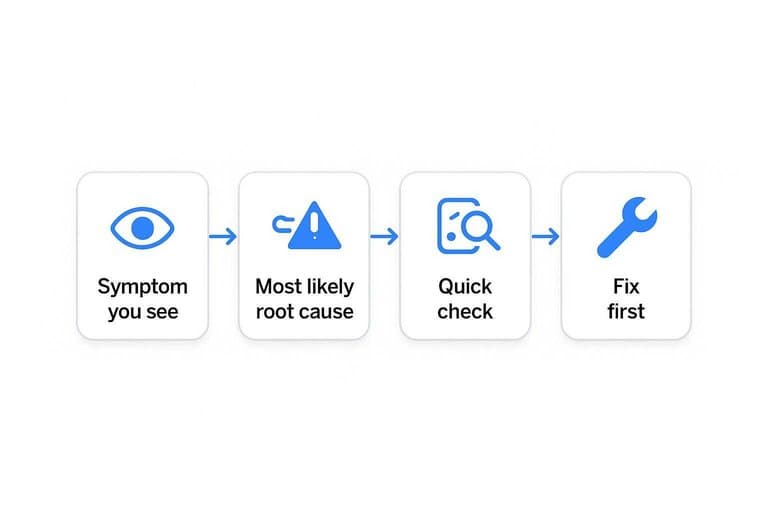
You don’t need more guesses. You need a fast way to map a visible symptom to the likeliest failure point.
| Symptom you see | Most likely root cause | Quick check | Fix first |
|---|---|---|---|
| Open shifts by 1 hour | DST rule mismatch | Compare TZ DB versions | Update tzdata |
| Open shifts by 30–90 min | Wrong exchange calendar | Verify market holiday list | Swap calendar source |
| Open varies per user | Local timezone leakage | Log server vs client TZ | Normalize to UTC |
| Open correct today, wrong later | Stale calendar cache | Inspect cache TTL | Bust cache on updates |
| Open wrong only on some symbols | Wrong venue mapping | Check symbol→exchange map | Fix routing table |
Treat the first matching row as your starting hypothesis, then prove it with logs.
Timezone Is Lying
Your market open time is wrong because you have multiple timezones pretending to be “the” timezone. Your laptop, your server, the exchange, and your user can all disagree, quietly.
If you ever saw “opens at 9:30” turn into “opens at 8:30,” this is the bug.
Three timezone layers
You have three clocks in play, and only one should control trading timestamps. Mix them, and you get the classic “works on my machine” schedule.
Device/server timezone: where code runs. Exchange timezone: where the session rules are defined. Display timezone: what you show users.
Conversions should happen at the edges:
- Ingest: parse vendor timestamps into UTC immediately.
- Core logic: store and compute in UTC.
- UI/export: convert UTC into the user’s chosen IANA zone.
If your business logic ever depends on server local time, you already crossed the line.
DST failure patterns
DST bugs don’t look random. They look like a system that’s “mostly right” until a calendar flips.
- Open times shift by one hour for weeks
- Only some symbols show the shift
- Live data differs from historical data
- Backtests differ by deployment region
- “Fixed offset” zones appear in configs
When you see selective breakage, you’re staring at timezone assumptions, not bad data.
Fix timezone plumbing
You fix this once by making time boring. UTC inside, named zones at the edges.
- Store all timestamps in UTC, everywhere.
- Use IANA zones like
America/New_York, not-05:00. - Convert session rules using the exchange’s IANA zone.
- Convert for display using the user’s selected IANA zone.
- Add tests across DST start and end weekends.
Do it now, before your next DST weekend becomes an incident.
Calendar Data Is Stale
Your open time is only as good as your calendar feed. One mis-labeled holiday or early close turns “market opens at 9:30” into a quiet failure you notice after the fill.
I’ve seen vendors mark Juneteenth as a normal session and label the day “regular hours.” Your algo keeps firing. Liquidity doesn’t.
Detect stale calendars
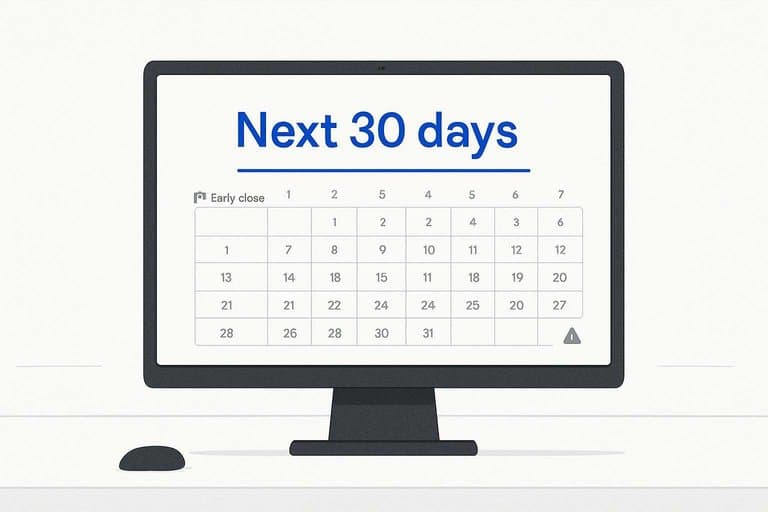
Stale data hides in the next few sessions, not last year’s history. Check the next 30 days because that’s where your trading decisions live.
- Compare the next 30 days to the exchange’s official calendar.
- Validate early-close flags and the exact close timestamp.
- Verify holiday regions per venue, not per ticker.
- Spot-check the next known special day, like a half-session.
If you can’t detect drift fast, you’ll trade a schedule that no longer exists.
Vendor limitations
Most calendar feeds fail in the same predictable ways. You need to know the failure modes before you trust any timestamp.
- Assume US-only holiday coverage
- Miss ad-hoc closures and emergencies
- Update late after exchange notices
- Map symbols to the wrong venue
Treat vendor calendars as inputs, not truth, and your systems get safer overnight.
Repair calendar ingestion
Fixing calendar ingestion is mostly plumbing and discipline. Cache for speed, but refresh on a schedule you can explain.
Use a two-layer cache: a short TTL for the next 7 days, and a longer TTL for future dates. Pull updates daily, plus an extra run before your trading day starts. Keep a fallback source, like the exchange ICS or a second vendor, and diff them. Write audit logs for every schedule change, including old value, new value, source, and timestamp.
When a calendar changes, you want an alert, not a postmortem.
Symbol-to-Exchange Mapping
Your “market open” can be wrong even when your timezone math is perfect. The usual culprit is venue mapping that silently points your symbol at the wrong exchange, like treating “BABA” as a US session when you meant the HK listing.
Mapping red flags
Wrong mapping shows up as contradictions, not errors. You’ll see clean data that still “opens” at the wrong hour because it’s the wrong venue.
Same ticker, different venues. “RIO” in London isn’t “RIO” in New York.
ADRs vs primary listings. “TSM” trades in the US, but Taiwan sets the real session.
CFDs and synthetics. “US30” or “AAPL.cfd” follows your broker’s hours.
Crypto pairs aren’t exchanges. “BTCUSD” on Coinbase isn’t “BTCUSD” on Binance.
Consolidated vs primary confusion. SIP prints can look open while the primary is still closed.
If any of these appear, your calendar is fine and your mapping is not.
Quick mapping checks
You can usually confirm the venue in minutes. Check metadata before you touch timezones.
- Verify the MIC code for the trading venue.
- Confirm the instrument’s primary listing exchange.
- Read your broker’s “trading venue” or “exchange” field.
- Compare against the issuer’s official instrument page.
If MIC and primary listing disagree, your “open” time is already suspect.
Fix the mapping
Treat venue as first-class data. Symbols are just labels.
- Normalize symbols into stable instrument IDs.
- Store MIC and venue per instrument.
- Support suffix tickers like “.L”, “.HK”, “-USD”.
- Avoid hardcoded “ticker implies exchange” rules.
Once mapping is explicit, open times become deterministic instead of guesswork.
Lock in the Correct Open Time for Good
- Verify the “true open” against the exchange’s official schedule and confirm which session type you’re using (regular vs pre/post vs auction).
- Reproduce the issue with a minimal example and run it through the root-cause matrix to classify it as timezone/DST, calendar staleness, or mapping.
- Fix the plumbing at the lowest layer: standardize timezone conversions (IANA IDs, UTC boundaries, DST rules), refresh/validate calendar ingestion, and correct symbol-to-exchange mapping with automated checks.
- Add a regression test suite for known edge-case opens (DST transitions, holidays, half-days, auctions) so the open time can’t silently drift again.
Frequently Asked Questions
What time does the U.S. stock market open in my time zone?
The NYSE and Nasdaq regular session opens at 9:30 a.m. Eastern Time; convert from ET to your local time using a timezone-aware converter (e.g., Timeanddate or your platform’s built-in timezone setting). During Daylight Saving Time shifts, the local-time equivalent can change even though it’s always 9:30 a.m. ET.
Does the stock market open at the same time every day, including Mondays and after holidays?
On normal trading days it opens at 9:30 a.m. ET, but the market is closed on U.S. market holidays and sometimes closes early (commonly 1:00 p.m. ET). Always check the official NYSE/Nasdaq holiday calendar for the specific date.
Is pre-market the same as the stock market open time?
No. Pre-market trading starts earlier (often 4:00 a.m. ET on many brokers/ECNs), but the “stock market open” usually refers to the 9:30 a.m. ET regular session when primary liquidity and official opening prints occur.
Why does TradingView/Robinhood/Webull show a different market open time than Google?
Most differences come from showing different sessions (pre-market vs regular), using a different exchange/venue schedule, or applying timezone/DST conversions differently. Verify you’re viewing the “Regular” session and that the chart/symbol is mapped to NYSE/Nasdaq with the correct exchange timezone (ET).
How can I confirm the exact open time for a specific stock or ETF?
Check the listing exchange (NYSE, Nasdaq, or another venue) on the security’s profile page, then verify that exchange’s official trading hours for that date. For broker platforms, confirm whether the order ticket is set to “Regular Trading Hours (RTH)” versus extended hours.
Trade With Cleaner Context
When open times, calendars, and exchange mappings don’t line up, your scans and routines drift—making it harder to judge leadership and market regime correctly.
Open Swing Trading delivers daily-after-close relative strength, breadth, and sector/theme rotation context across ~5,000 stocks so you can build higher-quality watchlists faster—get 7-day free access with no credit card.