Why Your Swing Trading Scanner Misses Breakouts Weekly
A practical troubleshooter for fixing swing-trading scanners that miss breakouts—diagnose missed-signal symptoms, audit data-feed integrity, align timeframes and bar closes, correct rule logic, and tighten verification with a repeatable test playbook.
Why Your Swing Trading Scanner Misses Breakouts Weekly
A practical troubleshooter for fixing swing-trading scanners that miss breakouts—diagnose missed-signal symptoms, audit data-feed integrity, align timeframes and bar closes, correct rule logic, and tighten verification with a repeatable test playbook.
If your scanner “never” finds the same breakouts you spot on the chart, you’re not imagining it—most misses come from a few repeatable failure points. A 1–2 minute feed delay, a bar-close mismatch, or one over-tight filter can quietly erase an otherwise valid setup.
This troubleshooter helps you pinpoint where your pipeline breaks: data quality, timeframe aggregation, rule logic, liquidity filters, alert windows, and platform limits. You’ll leave with a verification routine that proves the fix before the next breakout week slips by.
Weekly Missed Breakouts
Your scanner misses breakouts you can “see” on the chart. You feel it every week because the move already happened when you notice it.
For swing trading, a breakout is a clean push above a well-watched level. Think prior week high, a multi-day range top, or a pivot. It also has to be tradable, not just printable.
Common symptoms
The pain is consistent, and the pattern repeats. You’re not imagining it.
- Get no alerts on obvious breakouts
- Get alerts after the move is extended
- Get flooded with false breakout candidates
- See breakouts on charts, not in results
If two or more hit weekly, your scanner is misaligned with your trading rules.
Quick reality checks
Do three fast checks before you change anything. You want proof, not vibes.
- Compare your watchlist breakouts against scanner results that day.
- Verify alert timestamps against the candle that actually broke.
- Mark which breakouts were tradable before extension or reversal.
If the “miss” isn’t tradable, your scanner isn’t the problem.
Root-cause map
Most “missed breakouts” come from five buckets. Each one creates a different failure, even if the chart looks obvious.
Data issues hide the print or delay it. Rules filter it out on a technicality. Timeframe choices shift the breakout candle. Liquidity filters exclude the ticker you’re watching. Execution windows miss the first clean entry.
Fix the bucket, not the breakout.
Data Feed Gaps
Your scanner can be perfect and still miss the trade if the data is wrong. A single delayed quote or mis-scoped session can move the “high of day” enough to cancel a breakout. You’ll see it as “no trigger,” while your chart shows a clean push through resistance.
Delay and sessions
Delayed feeds and session settings quietly rewrite your breakout levels. If your scanner uses RTH only, but your chart includes premarket, your “daily high” becomes two different numbers.
Example: a stock tags 52.10 premarket, then breaks 52.05 at 10:15. Your scanner sees no breakout because 52.10 is the true high in its session model.
Align sessions first, then judge signals.
Bad OHLC prints
Most missed breakouts trace back to one broken candle. It usually comes from a few repeat offenders.
- Bad ticks spike the high or low
- Consolidated feeds mis-merge venues
- Corporate actions distort adjusted prices
- Symbol changes break continuous history
- Weekend maintenance drops bars
One ugly print can invalidate a week of setups.
Fix the feed
Treat data like infrastructure, not a preference. Fix it once, then your scans stop “randomly” failing.
- Verify your vendor’s OHLCV source and timestamp rules.
- Switch to real-time quotes for scan inputs.
- Standardize one session template across tools.
- Refresh symbol mappings for splits, mergers, and renames.
- Audit adjusted versus unadjusted history per strategy.
After this, a missed breakout is your logic, not your plumbing.
Timeframe Mismatch
Your scanner and your chart can both be “right” and still disagree. It happens when you scan daily breakouts using intraday rules, or scan intraday breakouts using daily logic. Bars are not raw ticks; they’re constructed, and different construction hides different signals.
Bar close dependency
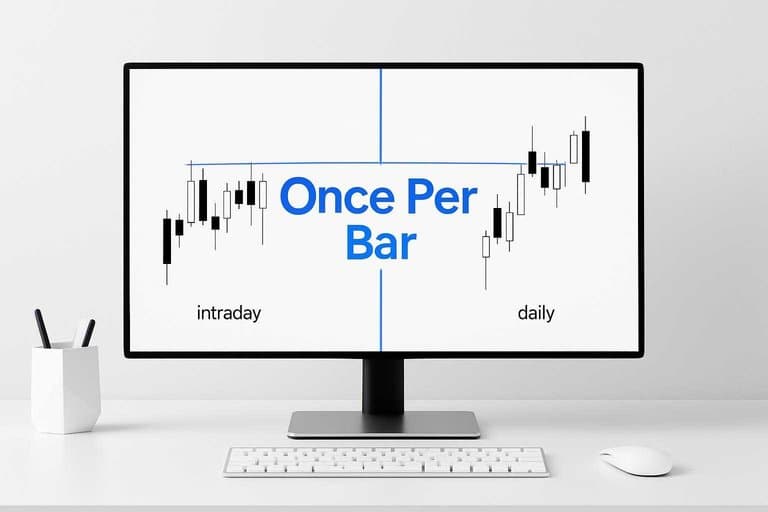
A lot of scanners only trigger on a bar close, while your eyes react to intrabar spikes. You see price pierce yesterday’s high at 10:17 and think “breakout,” but the daily bar never closes above it.
That gap is common with daily scans on intraday charts and with “high of day” rules that aren’t “close above level” rules. If your scan uses “close > resistance” and your chart is showing “wicked through resistance,” the scanner is doing exactly what you told it.
Decide whether you trade breakouts on confirmation closes or on intrabar momentum, then code for that reality. (TradingView users also run into this with “Once Per Bar” alert behavior while candles are still forming.)
Aggregation pitfalls
Most “missed breakouts” are really “different bars.” The smallest time setting difference can change highs, closes, and signals.
- Mixing 5m entries with 15m scan logic
- Using the wrong exchange timezone offset
- Scanning partial bars before they finish
- Including premarket in one view only
- Rolling weekly bars on different days
If two platforms don’t build the same bar, they can’t agree on a breakout.
Align time settings
Pick one “source of truth” for bar construction and force everything else to match it.
- Match your scan timeframe to your chart timeframe.
- Set the exchange timezone, not your local timezone.
- Define sessions: RTH only or RTH+ETH, then keep it consistent.
- Choose one trigger type: close confirmation or intrabar alerting.
- Re-run the scan on completed bars only.
When your bars match, your results stop feeling random and start feeling testable.
Rule Logic Errors
Your scanner can be “right” and still miss the trade. Tiny logic slips change what qualifies, especially on weekly breakouts.
One bad operator, one wrong lookback, and the breakout never even gets evaluated. That’s the line that gets crossed.
Lookback mis-specified
Most breakout rules fail because you asked for the wrong high. The code runs clean, but it’s measuring a different window than you think.
Examples that quietly break weekly signals:
- Excluding the current bar:
close > highest(high, 252)[1]vsclose > highest(high, 252) - Weeks vs days mismatch:
highest(high, 52)(52 days) when you meant ~252 days - Wrong offset direction:
highest(high, 252)[-1](platform-dependent) pulling future or invalid data - High vs close confusion:
close > highest(close, 252)when you intended a price breakout on highs
Fix the lookback first, because every other filter depends on that single comparison.
Over-tight filters
Breakouts are messy, especially the good ones. If your filters demand a perfect textbook candle, you’ll filter out real moves.
Common blockers that reject valid breakouts:
- Requiring volume ≥ 3× average
- Capping ATR% below a tight ceiling
- Enforcing a strict spread maximum
- Gating entries behind RSI thresholds
- Rejecting gaps above a fixed percent
If you need five green lights, you don’t have a scanner—you have a veto machine.
Rewrite the conditions
You can’t debug a blob of boolean logic by staring at it. You need to isolate, prove, then layer back carefully.
- Isolate the breakout rule into one clause.
- Test it on known breakout tickers and dates.
- Add tolerances like “within 0.2%” of the level.
- Reorder filters so liquidity checks run before indicators.
- Log which clause fails for each rejected symbol.
When you can see the first failing clause, fixing the scanner becomes mechanical.
Liquidity and Slippage
Thin stocks love to “break out” on a chart because the last trade prints clean levels. Your scanner still rejects them because its rules are built for fills, not screenshots. That’s the trade-off between pretty candles and executable entries.
Tradability thresholds
Your scanner uses tradability thresholds to avoid signals you can’t enter without paying up. A “$2 breakout” isn’t real if you need a $2.08 fill.
Most scanners gate breakouts with constraints like:
- Average share volume: ensures enough prints to enter and exit
- Dollar volume (price × volume): filters cheap names with fake “activity”
- Spread % (spread ÷ mid): blocks charts where the market is the tax
- Volatility vs spread: rejects moves that are smaller than the spread
Those filters interact fast. A stock can clear the breakout rule, then fail on spread %, or pass volume but fail dollar volume.
If your breakout disappears after adding spread and dollar volume, it wasn’t a breakout. It was illiquidity.
Where it breaks
Thin names fail in specific, repeatable ways. They look tradable until you model the fill.
- Spread explodes at the open
- Halts freeze your entry and exit
- Low-float spikes jump levels instantly
- Single-print highs fake resistance breaks
- Volume prints late or unreliably
Your scanner isn’t “missing” these. It’s refusing to recommend a bad fill.
Fix with tiers
You need tiers because “idea quality” and “fill quality” are different problems.
- Define 3 liquidity tiers using dollar volume and spread %.
- Build an “idea scan” that allows thin tier signals.
- Build a “trade scan” that only pulls your tradable tiers.
- Add time-of-day spread filters for the first 5–30 minutes.
- Route thin-tier hits to alerts, not orders.
You’ll still see the breakouts. You just won’t confuse them with trades.
Alert Timing Window
A breakout is a timing problem before it’s a stock problem. If your scanner checks once per day, you’re trading yesterday’s tape.
When breakouts occur
Breakouts rarely arrive at your convenient scan time, and they often resolve fast. Think “open-range pop,” “midday fake-out,” and “3:30pm squeeze” in the same ticker.
Common patterns:
- Open range (first 15–60 minutes): volume hits, levels break, then either trends or reverses.
- Lunchtime drift: price compresses, then triggers stops on low liquidity.
- Late-day push: institutions finish, closes above levels, and sets next-day follow-through.
If you only scan end-of-day, you miss the trigger and only see the aftermath. That’s how you end up buying the headline candle.
Schedule mistakes
Most weekly misses come from boring scheduling errors, not “bad criteria.” Your scanner is on, but it’s not watching.
- Running scans 30–90 minutes before close
- Scanning only on weekends for “Monday ideas”
- Hitting API rate limits and silently skipping symbols
- Refreshing too rarely during high-volatility sessions
- Misreading market holidays and missing sessions
Fix the calendar first. Breakouts don’t care about your cron job.
Fix the cadence
You need a cadence that matches how breakouts form and confirm. Build a schedule that catches both the trigger and the close.
- Add intraday checkpoints like 10:00, 12:30, and 15:30 ET.
- Run a “near-close” scan in the final 5–10 minutes.
- Use webhooks or push alerts so triggers reach you immediately.
- Store triggered candidates and rescan next session for follow-through.
Your edge isn’t faster alerts. It’s consistent capture of the same setup lifecycle.
Platform Constraints
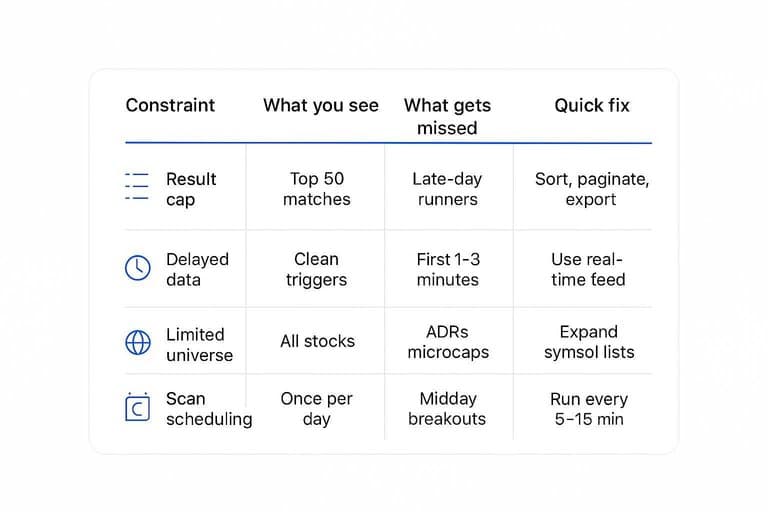
Your scanner can be “right” and still miss breakouts because the platform filters first. Limits hide inside defaults like capped results, delayed prints, and restricted universes.
A quick comparison shows where weekly breakouts quietly get excluded.
| Constraint | What you see | What gets missed | Quick fix |
|---|---|---|---|
| Result cap | Top 50 matches | Late-day runners | Sort, paginate, export |
| Delayed data | Clean triggers | First 1–3 minutes | Use real-time feed |
| Limited universe | “All stocks” | ADRs, microcaps | Expand symbol lists |
| Coarse filters | Simple price/vol | Tight consolidations | Add ATR, range filters |
| Scan scheduling | Once per day | Midday breakouts | Run every 5–15 min |
If your scan returns the same “usual suspects,” you’re hitting platform ceilings, not market reality.
Breakout Definition Drift
Your scanner misses “breakouts” because you and your scan don’t mean the same thing by that word. One trader means “range expansion,” another means “prior high reclaim,” and both call it a breakout.
Your scan needs a breakout type with explicit parameters, not a vibe.
| Breakout style | Market structure | Must-have parameters | Common scan failure |
|---|---|---|---|
| Range expansion | Tight base | ATR burst, volume spike | Uses fixed % move |
| Prior high reclaim | Key level | Close above, retest rule | Triggers on intraday wick |
| Volatility squeeze | Low vol coil | BB width, ATR contraction | Ignores volatility regime |
| Trend continuation | Pullback in trend | Higher low, trend filter | Scans flat markets |
| Gap-and-go | News gap | Gap %, open range | Treats gaps as breakouts |
Pick one row and codify it; “breakout” is not a strategy until you do. And make sure the levels you’re referencing aren’t shifting due to corporate actions by understanding adjusted vs unadjusted price history.
Verification Playbook
You don’t fix a scanner by “feeling” better about it. You fix it by proving it catches the breakouts you care about, on repeat.
Treat this like a regression test. Same inputs, same expectations, same results.
Build a test set
Collect real misses so you can test changes against the exact pain. Twenty is enough to expose patterns fast.
- Pull 20 recent breakouts you expected to catch.
- Record date, time, and ticker for each move.
- Log key levels: base high, trigger price, and close.
- Capture volume, relative volume, and any gap info.
- Mark “caught” or “missed” by your current scan.
If you can’t name the misses, you can’t prove the fix.
Diagnose one variable
Your scanner has multiple failure modes. Change one knob at a time or you’ll “fix” it by accident.
- Pick one setting to test, like session filtering.
- Change only that setting, leaving everything else untouched.
- Re-run the scan against your 20-breakout test set.
- Record hit rate and new false positives.
- Repeat for lookback, volume filter, and close rule.
When one setting flips five misses to hits, you found the real culprit.
Lock in defaults
Once it works, freeze it. Write down the final settings, save them as named templates, and note the data source and market session assumptions.
Add a simple monitor for feed delays and missing bars, because a “broken” scanner is often just late data. Track weekly metrics like hit rate on your test set, average lead time before breakout, and false positives per day.
Your edge isn’t the filter. It’s the version control.
Lock the Fix In Before Next Week’s Setups
- Build a small “known breakout” test set (20–50 tickers) and replay the exact dates/times your charts show the move.
- Change one variable at a time—feed/session settings, timeframe/aggregation, rule conditions, liquidity tiers, then alert cadence—until the miss disappears.
- Save those working defaults as a locked scanner preset, and re-validate weekly (especially after platform updates, watchlist changes, or data-provider switches).
Frequently Asked Questions
What’s the best way to backtest a swing trading scanner to confirm it catches breakouts before I trade it live?
Run it on 6–12 months of historical data and compare the scanner’s “would-have-alerted” timestamps to a clean breakout list you build from charts or exports. If the scanner can’t reproduce past breakouts within 1 bar of your intended trigger, the logic or data source isn’t reliable enough for live alerts.
Should a swing trading scanner use end-of-day data or real-time data for breakout alerts?
Most swing traders get cleaner signals using end-of-day (EOD) data and placing orders for the next session, because the daily close reduces false breakouts. Use real-time only if your strategy explicitly requires intraday confirmation and you can handle more noise and more frequent invalidations.
How do I measure whether my swing trading scanner has a data quality problem?
Spot-check 20–50 symbols by comparing OHLCV and volume to a second source (TradingView, Nasdaq/NYSE prints, or your broker) and log any mismatches. If discrepancies show up more than occasionally (e.g., multiple symbols per week), switch feeds or normalize adjustments before trusting breakout scans.
Can I build a swing trading scanner using free tools, or do I need paid data and platforms?
You can build a basic scanner with free sources (e.g., TradingView alerts, free Yahoo/Polygon tiers), but coverage, adjustment accuracy, and intraday reliability are usually limited. Paid feeds/platforms become worth it when you need consistent EOD adjustments, full universe coverage, and dependable alert delivery.
How many results should a swing trading scanner return, and what if it returns zero most weeks?
A healthy breakout scanner often returns a small, tradable list (commonly 5–30 names) depending on market regime and your universe size. If you see zero most weeks, widen one constraint at a time (universe, volume floor, breakout threshold) until you consistently get candidates, then tighten back to match execution reality.
Find Breakout Leaders Faster
When your swing trading scanner misses breakouts, it’s usually the context—relative strength, breadth, and rotation—behind the alert that’s missing or drifting week to week.
Open Swing Trading adds daily RS rankings, market breadth, and sector/theme rotation context across ~5,000 stocks so you can build higher-quality breakout watchlists in minutes. Get 7-day free access.
Sources
- Issue with “Once Per Bar” alert — TradingView Support — referenced in Bar close dependency
- Adjusted vs Unadjusted Prices | Koyfin Help — referenced in Breakout Definition Drift